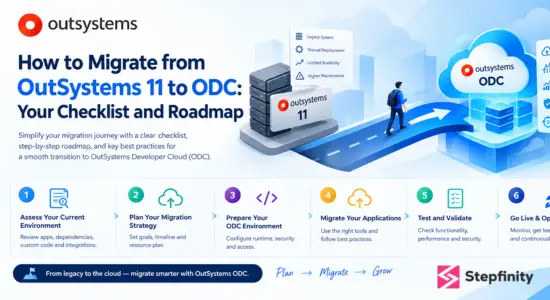
If you’ve been using OutSystems 11 (O11) for your applications, OutSystems Developer Cloud (ODC) migration must have crossed your online feed or internal team discussions. In this blog, we are going to discuss why, when, and how you can migrate your applications from O11 to ODC. So read along!
With your applications already built on OutSystems 11 (O11), migrating the whole thing to OutSystems Development Cloud (ODC) seems very intricate, and it feels like a task that you need to start learning from scratch, as there are no drag-and-drop options available where you can just select your applications from O11 and upload them to ODC.
While OutSystems 11 to ODC migration may look complicated, it’s not as hard anymore. With the OutSystems Unification Announcement and Conversion Assessment Tool (Nov 2025), Logic Interoperability (10 Apr 2026), and ODC Self-Hosted interoperability (25 Aug 2026), the migration is becoming easier and more efficient.
This article is a toolkit, checklist and roadmap for OutSystems 11 to ODC migration for your applications. With this article, you can assess your O11 estate, decide where ODC fits for your applications, and plan execution, integrations and operation changes.
What Is OutSystems ODC and How Is It Different from OutSystems 11?
It is the fast AI era where everything requires to be built and deployed fast and efficiently, it’s the high time when businesses should choose systems that can deliver applications as per market requirement and can be built faster than traditional ones. To meet this, OutSystems has two platforms, O11 and ODC.
OutSystems 11 (O11) is a low-code platform that runs on .NET with SQL Server and supports both on-premises and cloud deployment.
OutSystems Developer Cloud (ODC) is a newer, cloud-native, AI agentic platform based on the foundation of Amazon Web Services (AWS) native cloud services. It is built on Kubernetes with Aurora PostgreSQL. ODC can generate AI enterprise-grade web apps, mobile apps, or agentic apps in just a few weeks as it prioritises speed and simplicity.
What does ODC being cloud-native mean? It means ODC is optimised for a cloud environment, implying that the low-code development platform for building and deploying apps and the independent runtime infrastructure for hosting and execution of apps are both created, deployed, and scaled natively inside the cloud using modern cloud principles.
As ODC is the newer cloud-native version, businesses are looking forward to migrating their applications from O11 to ODC because of its faster and simpler features. But before understanding the process of migration, let’s understand the core difference between O11 and ODC so that, instead of a hasty migration, you can decide what fits better for your business.
Comparison between OutSystems 11 (O11) and OutSystems Developer Cloud (ODC)
| Area | O11 | ODC |
| Release status | Established | Newer |
| Hosting | Cloud, on-prem | Cloud-native |
| Infrastructure | Customer-managed | OutSystems-managed |
| Core technology | .NET | Kubernetes |
| Database | SQL Server, Oracle | Aurora PostgreSQL |
| Development tool | Service Studio | ODC Studio |
| Management tool | Service Centre, LifeTime | ODC Portal |
| App structure | Modules | Libraries |
| Web app types | Reactive, Traditional | Reactive only |
| Workflows | BPT | ODC Workflows |
Why and When to Migrate from OutSystems 11 to ODC
So far, we have understood the core differences between OutSystems 11 and ODC, now is the time to understand in detail why your business needs to migrate from OutSystems 11 to ODC and when it should migrate.
OutSystems itself talks about how ODC is not a necessary replacement for O11; that your business must do, rather it’s another option that can be better for your business.
If you have Mission-critical apps integrated with SAP, Oracle, and custom backends, and they require on-premises hosting, then O11 is the best option for your business with the control that it needs.
And here’s why migrating your application from OutSystems 11 to OutSystems Developer Cloud (ODC) can be a good step for your applications.
- ODC can scale automatically with Kubernetes and microservices architecture.
- ODC has a fully managed SaaS model for application architecture.
- ODC comes with a simplified development environment for faster development.
- ODC can be seamlessly integrated with AWS, Azure, and Google Cloud services.
ODC is best if your business needs cloud-first modern AI applications and agents, and when faster deployment and simplicity are a priority.
Now that we understand how migrating to ODC from O11 can be a good choice for your business, here is when you should migrate.
Do not consider O11 to OutSystems migration as a forced deadline; you should decide when to migrate based on your readiness and application architecture.
When to migrate (Key triggers)
- Your O11 apps are fully reactive.
- Your architecture and refactor code are prepared.
- You are prepared for Integration model shifts.
- You can handle phased domain migration.
To understand better and decide when and why you should migrate your application, connecting with an OutSystems partner like Stepfinity for a short readiness conversation can clarify better.
Before You Migrate: How to Assess Your O11 Applications
Before you begin to migrate your applications from O11 to ODC, you can assess your O11 applications to evaluate their readiness for migration. OutSystems, in November 2025, launched its own Conversion Assessment Tool. It can assess your applications for migration readiness on the basis of their code, data and infrastructure to ensure that they can be converted.
You can either set up the conversion assessment tool yourself or ask your OutSystems partner provider to set up the tool for your applications’ migration.
To set up the tool, your O11 infrastructure needs to have an ODC subscription, the O11 platform should use Server 11.18.1 or later, and if your company’s developers log in with an unsupported method, the Single-Sign-On Between Apps Types setting must be on.
Using the Conversion Assessment Tool, you can convert your O11 apps to ODC assets for designing your ODC architecture blueprint or to use them as building blocks for future ODC apps. Afterwards, define conversion plans by grouping the ODC assets. The Conversion Assessment tool can help you identify any challenges such as whether there are any ODC features that need to be changed or implemented differently in ODC.
Conversion Assessment tool components:
Conversion Assessment tool consists of the following components:
- Installer: it is a setup helper; it helps to set up and install parts of the tool and helps in updating the tool further.
- Console: This is the user interface where you map your O11 apps to ODC assets, define conversion plans, and see assessment reports.
- Probe: It runs the assessment of your apps and sends the findings to the engine.
- Engine: It keeps track of the findings received from Probe and is the communication entry point between O11 and ODC.
The conversion assessment tool follows an assessment cycle in which it re-checks apps on a schedule, so the report stays updated and current.
The assessment of O11 applications for migrating to ODC gives you a clear view and understanding of which applications are ready to migrate or whether they need some work to be done.
Your OutSystems 11 to ODC Migration Checklist
After understanding and setting a clear view over your applications’ migration, here’s your OutSystems 11 to ODC migration checklist, refer to this structured and a multi-stage workflow checklist.
- Inventory and prioritise applications: Build an inventory where you list all your O11 applications, how they are owned, which ones are currently in use, and prioritise which applications should be assessed and migrated first. Record these for each O11 application you own to set the priority: Business importance, number and type of users, complexity, integrations, data volume, ownership, application type, and its usage.
- Review architecture and dependencies: Review the architecture to understand how an application is organised and divided into parts. Analyse its O11 structure (made of modules), then understand the ODC structure, as it has no modules, in ODC, you work with apps and libraries. With this, an O11 app with modules needs to be reorganised into ODC apps and libraries. Review the dependencies to know which part of the app is dependent on or requires another part to function. There may exist undocumented hidden dependencies, which may result in errors and migration failure.
- Check integrations and external systems: Review all the integrations and connections of your O11 application with external sources or systems, such as third-party services or apps, APIs or other company systems. This is to make sure that these connections work properly after the migration. With Logic Interoperability (10 Apr 2026), ODC apps can reuse existing logic of O11, so certain logic may not need to be rebuilt while migrating.
- Plan data migration and database handling: Decide and map how your application’s data is supposed to migrate from the old database to the new database. O11 uses SQL Server or Oracle for the database, and ODC uses Aurora PostgreSQL; here, this can be a tough part in migrating data from O11 to ODC because of Database differences. OutSystems has launched Conversion Kit’s data transfer feature (currently Beta), which can help make the data migration easier in future.
- Set up the ODC environment and stages: Get the destination ready where your applications will migrate in ODC. Set up your company’s ODC space (ODC tenant; this is where all your applications are built and run in ODC), your control page (ODC portal; here the ODC tenant is managed by the administration) and separate areas (Stages; these are the areas where your applications run for specific purposes) where the applications are built, tested, and used by the users.
- Rework unsupported features and components: Rework those features and components of your application that are not supported or do not exist in ODC. Check your assessment report for changed features, Forge components that do not have an ODC version and traditional web apps. The Conversion Kit’s code (now Beta) in future can help with translating code structures in future, but a review will still be required.
- Test functionality, performance, and security: Before making the applications available to real-time users, run tests on the functionality, performance and security of the application to make sure that no errors or issues arise once the application is live. An additional probe in a QA environment in ODC lets you check the functionality, performance and security, and the readiness of your application during testing.
- Plan the cutover and rollback and monitor go-live: Plan your application cutover (how users will switch to the new application) and rollback (your application’s safety net; how to go back if something doesn’t perform well). Cutover includes final data transfer to ODC from O11, a final check for errors, and disabling or removing the older version. OutSystems’ interoperability updates let O11 and ODC work together, which can lower the risk, as the old version still remains available as the new one is coming into work.
As the application goes live after migration, monitor it closely to catch the issues earlier. Watch for the application’s speed, responsiveness, and user feedback to identify the issues and resolve them, as the first few weeks are the high-risk time, so monitoring closely to catch issues earlier becomes crucial
OutSystems ODC Migration Roadmap: A Phased Approach
The above checklist on O11 to ODC migration should have given you an idea of what you need to do at different stages of migration; now let’s go through this roadmap where you can understand how exactly you can migrate your applications from O11 to ODC.
Here’s your roadmap for “how to migrate applications from O11 to ODC” in just 4 steps!
Step 1: Assess your applications
The first step is to evaluate and understand what applications should migrate to ODC, and how ready they are to migrate from O11 to ODC, what’s there compatibility, and what needs to change or update. We’ve discussed how you can assess your applications in the Before You Migrate: How to Assess Your O11 Applications section. So now start with the assessment by defining the applications that should be migrated, and categorising them based on whether they are perfectly fit to migrate, need a few adjustments, or need to be rebuilt entirely.
Step 2: Prepare and pilot
As the assessment is finalised and you now have the data. You can start with phased migration of your application portfolio, meaning start with migrating data one by one or in small groups rather than migrating everything at once. You can start with a low-risk application by setting up an ODC tenant and stages with all the areas where it will run for the defined purposes. Then refactor the code from the older O11 version to match the ODC architecture wherever required (for example, convert TWAs to reactive applications), update services like SOAP-based integrations to APIs, and update SQL queries to comply with ODC databases.
Step 3: Validation and cutover
Check the migrated applications’ performance, functionality, and security. In this step, you need to verify whether all the systems are operating well. Check for user acceptance, if the data is synced, and plan for cutover and application rollback. In this stage, the application is not live to real-time users; you can test the application before the go-live.
Step 4: Optimisation and handover
Once the ODC applications pass all performance, functionality, and security checks, this is the time when the applications finally go live to real users. As the applications go live, a trained ODC tooling team of developers should monitor them closely to maintain a stable ODC environment and resolve issues in the early stages. Decommission the old O11 version of applications if they are not in use.
Doing It In-House vs. Working with an OutSystems Partner
After reading so far, if you’re thinking about whether you should do O11 to ODC migration in-house or hire an OutSystems Partner to do this for you. Here’s a brief guide for you.
If you’re working with a small application portfolio and have an experienced OutSystems team, then in-house migration may work for you.
If you’re working with a large application portfolio, your timelines are tight, and you have limited experience in OutSystems, then hiring an OutSystems partner is the best choice for you, as a partner comes with great experience and help with complex tasks in migrations.
Connect with Stepfinity, an OutSystems Silver partner, to get a better understanding of how an OutSystems partner can help with your application migration from O11 to ODC.
Conclusion
Migrating your applications from O11 to ODC may seem hasty at first, but it is a significant step for businesses looking forward to a future-proof position in the market. With new updates by OutSystems to make the migration less complex, the Conversion Kit’s code (currently Beta) can make it a much smoother and faster conversion in the coming days.
Let’s map your migration from O11 to ODC. Contact Stepfinity, an OutSystems Silver Partner, today!
FAQs
1. What is the difference between OutSystems 11 and ODC?
OutSystems 11 (O11) is a low-code platform that runs on .NET with SQL Server and supports both on-premises and cloud deployment while OutSystems Developer Cloud (ODC) is a newer, cloud-native, AI agentic platform based on the foundation of Amazon Web Services (AWS) native cloud services. It is built on Kubernetes with Aurora PostgreSQL.
2. Can I migrate my application portfolio from OutSystems 11 to ODC?
Yes, you can migrate your O11 applications to ODC. But as it is not a drag-and-drop process, a lot of work goes into this process, like application assessment, code refactoring, and database preparation, for which you may need a managed service provider (OutSystems partner).
3. How long will it take to migrate my application portfolio from O11 to ODC?
Migration timeline can depend on the size, complexity, integration, and data volume of your application portfolio. To understand better and estimate the timeline of full migration of your application portfolio you can discuss your application portfolio with an OutSystems partner.
4. Should I migrate my whole application portfolio at once?
No, OutSystems suggests phased migration over bulk migration. OutSystems interoperability update: both O11 and ODC can work together.
5. What is the OutSystems Conversion Assessment Tool?
Conversion Assessment Tool was launched by OutSystems (Nov 2025). It can assess your applications for migration readiness on the basis of their code, data and infrastructure to ensure that they can be converted.
6. What are the biggest challenges in migrating from O11 to ODC?
Database differences (SQL or Oracle in O11 and Aurora PostgreSQL in ODC), unsupported Forge components, and hidden dependencies can be some of the biggest challenges in O11 to ODC migration.
7. Should I migrate in-house or hire an OutSystems partner?
If you’re working with a small application portfolio and have an experienced OutSystems team, then in-house migration may work for you. If you’re working with a large application portfolio, your timelines are tight, and you have limited experience in OutSystems, then hiring an OutSystems partner can work best for you.

As a Full Stack Developer, I specialize in building scalable and business-driven web applications using .NET, ASP.NET Core, C#, Web API, SQL Server, and OutSystems. I have hands-on experience in developing REST APIs, database-driven applications, API integrations, and enterprise solutions, along with testing.