

| Project Type | Automated Testing Performance Optimisation |
| Platform | OutSystems 11 — Reactive Web Application |
| Problem | Server Action caused connection timeout on bulk automated test execution |
| Solution | BPT Process per 100-record chunk triggered on Entity Create, JS setInterval counter & AbortAutomatedTesting flag |
| Outcome | Zero timeouts; parallel BPT execution; real-time countdown; graceful abort |
1. Project Overview
This case study documents the investigation and resolution of a critical performance bottleneck in an automated test execution Screen built on OutSystems 11 (Reactive Web). The Screen executed thousands of test records, but the original synchronous Server Action implementation hit the platform’s request timeout, causing a “The connection has timed out” error before any results were saved.
The solution re-architected the execution layer using OutSystems Business Process Technology (BPT). On clicking the test button, a Client Action simultaneously starts a JavaScript setInterval (to poll the remaining record count every 5 seconds) and calls a Server Action (TestByBPT) that divides all test records into 100-record chunks. Each chunk is saved as a Chunk Entity record — whose On Create event automatically launches one Process_Testing BPT Process per chunk. Inside the BPT, each chunk is retrieved by ID, deserialised from JSON, and each test record is saved via a RecordSave node, with an IsAbortAutomatedTesting? Decision node allowing graceful cancellation at any point.
2. The Problem
2.1 Root Cause — Synchronous Server Action Timeout
When the test Screen triggered a full test run for a large dataset, a single synchronous Server Action was called. This Server Action attempted to:
- Fetch all test records into memory via a single Aggregate
- Iterate every record sequentially using a For Each node
- Execute the test logic and write each result to the database within the same request
- Return control to the Screen only after all records were processed
Because OutSystems Server Actions execute synchronously within the HTTP request lifecycle, the call exceeded the platform’s request timeout threshold. The Screen received a “The connection has timed out” error — no test results were saved and the application was left in an inconsistent state.
2.2 Evidence — Connection Timeout Error
The screenshot below captures the exact error returned to the Screen when the synchronous Server Action exceeded the OutSystems platform request timeout while trying to process a large batch of test records.

Screenshot 1 — Connection Timeout Error — The ‘The connection has timed out’ error displayed on the Screen when the synchronous Server Action could not complete within the platform’s request timeout window.
⚠ Impact of the Timeout
• Test runs failed completely — no test result records were written to the database
• The Screen showed only a generic timeout error with no context or progress information
• Users had no visibility into how many records had been processed before the failure
• No way to cancel or resume a failed run — a browser refresh was required each time
• Developers had to check Service Center error logs to diagnose each individual failure
3. The Solution
The root cause was attempting to process all records inside a single synchronous Server Action. The fix delegates all heavy processing to OutSystems BPT Processes — asynchronous jobs managed by the OutSystems Scheduler Service that run entirely outside the HTTP request thread and cannot be killed by a request timeout.
3.1 Architecture at a Glance
| BEFORE (Server Action) | AFTER (BPT Process Chunks) |
| ❌ All records in one Server Action flow ❌ Blocks the HTTP request thread ❌ Connection timeout error on Screen ❌ No progress feedback to user ❌ Cannot be cancelled | ✅ Records split into 100-record Chunk Entities ✅ One BPT Process launched per chunk (On Create) ✅ Scheduler Service runs async — no timeout ✅ JS setInterval polls remaining count every 5s ✅ IsAbortAutomatedTesting? flag for clean stop |
3.2 Step-by-Step Implementation
Step 1 — On Test Button Click: Start SetInterval & Launch TestByBPT
When the user clicks the test button on the Screen, a Client Action is triggered. It first assigns IsLoadingPopUp (to show a loading state on the Screen). The IsLoadingPopUp Assign node feeds into the StartSetInterval JavaScript node, which immediately begins polling every 5 seconds. The Client Action then calls the TestByBPT Server Action — which handles all chunk creation and BPT Process launching. The AllExceptions handler on the right catches any error, displays it via AllExceptions.ExceptionMessage, resets the IsLoader variable, and ends cleanly.
Screenshot 2 — On Test Click: Client Action Flow — The Client Action flow triggered on button click: Start → IsLoadingPopUp Assign → StartSetInterval JavaScript node → TestByBPT Server Action → End. The AllExceptions handler (right side) catches errors, shows the exception message, resets IsLoader, and exits gracefully.
Step 2 — StartSetInterval JavaScript Node: Live Countdown Polling
The StartSetInterval JavaScript node starts a setInterval that fires every 5,000 ms (5 seconds). On each tick it calls $actions.RefreshGetRemaining() — a Screen Action that calls a Server Action running two Aggregates: one summing the total records across all active Chunk Entity records, and another counting completed test result records. The difference is shown on the Screen as the remaining record count, counting down live as BPT Processes complete. The commented-out clearInterval(testInterval) line is called by the Abort button to stop polling when the user cancels the run.
The available Screen Actions visible in the JS node panel — including AbortOnClick, ClearOnClick, GetRemainingOnAfterFetch, and others — confirm the full set of user controls wired up to this Screen.
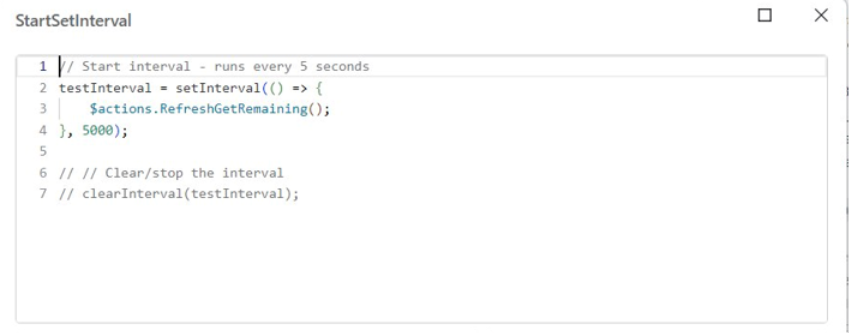
Screenshot 3 — StartSetInterval JavaScript Node — The JavaScript code: testInterval = setInterval(() => { $actions.RefreshGetRemaining(); }, 5000) — polling every 5 seconds to refresh the remaining record count on the Screen. The commented clearInterval line is called by the AbortOnClick Screen Action to stop polling when the user aborts.
Step 3 — TestByBPT Server Action: Clean Up & Create Chunks
The TestByBPT Server Action begins by cleaning up any previous run data for the user: DeleteAllTestRecord removes all existing test result records, and DeleteAllChunkByUser removes all old Chunk Entity records. This guarantees a clean slate before the new run begins.
The Server Action then enters the AllTestRecord For Each loop over all test records. On each iteration, ListAppend adds the current record to a local list. The IsChunkCompleted? Decision node checks whether the list has reached Site.chunksize (100 records):
- True → ChunkSave: the full list is serialised and saved as a Chunk Entity record, which automatically triggers Process_Testing via the On Create event. ListClear then resets the list.
- False → the loop cycles back (Cycle) to append the next record.
- When the For Each ends: chunkListEmpty? checks if any remaining records exist. If False → ChunkSave2 saves the final partial chunk (size less than Site.chunksize).
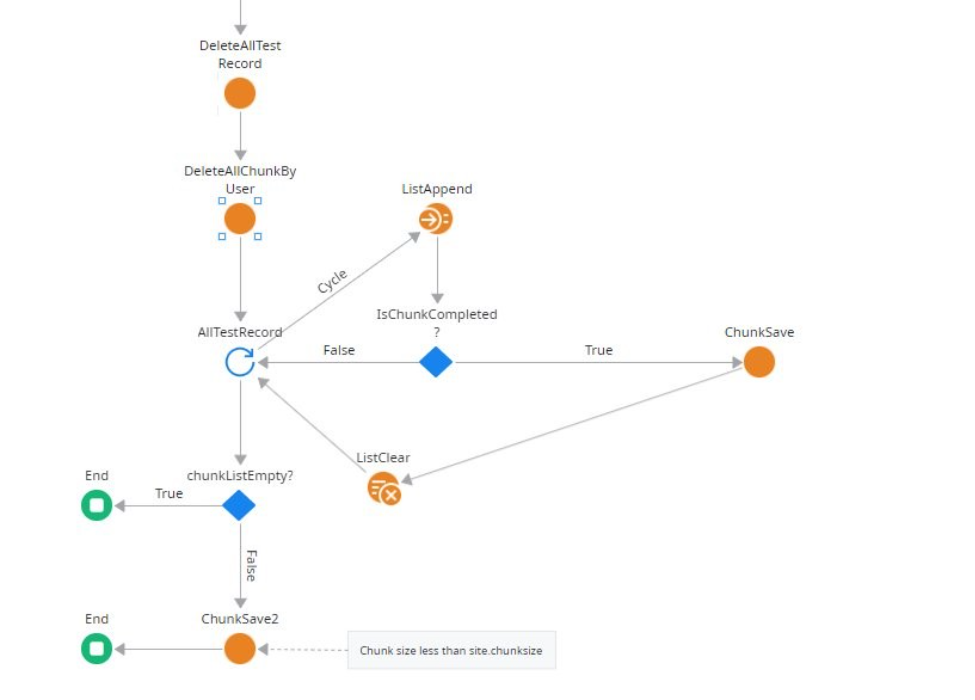
Screenshot 4 — TestByBPT Server Action: Chunk Creation Logic — The Server Action flow: DeleteAllTestRecord → DeleteAllChunkByUser (clean up previous run) → AllTestRecord For Each loop → ListAppend → IsChunkCompleted? Decision (True = ChunkSave full chunk + ListClear + Cycle; False = Cycle back). After loop: chunkListEmpty? (True = End; False = ChunkSave2 for the final partial chunk, with note ‘Chunk size less than site.chunksize’).
Entity — Chunk (Chunk Tracking)
Purpose: One record per 100-record chunk; its On Create event auto-launches Process_Testing BPT
Stores: Serialised test record list (JSON/Binary), UserId, CreatedOn, Status
On Create: OutSystems Scheduler Service automatically launches one Process_Testing instance
Key: ChunkSave and ChunkSave2 both trigger the BPT — the only difference is chunk size
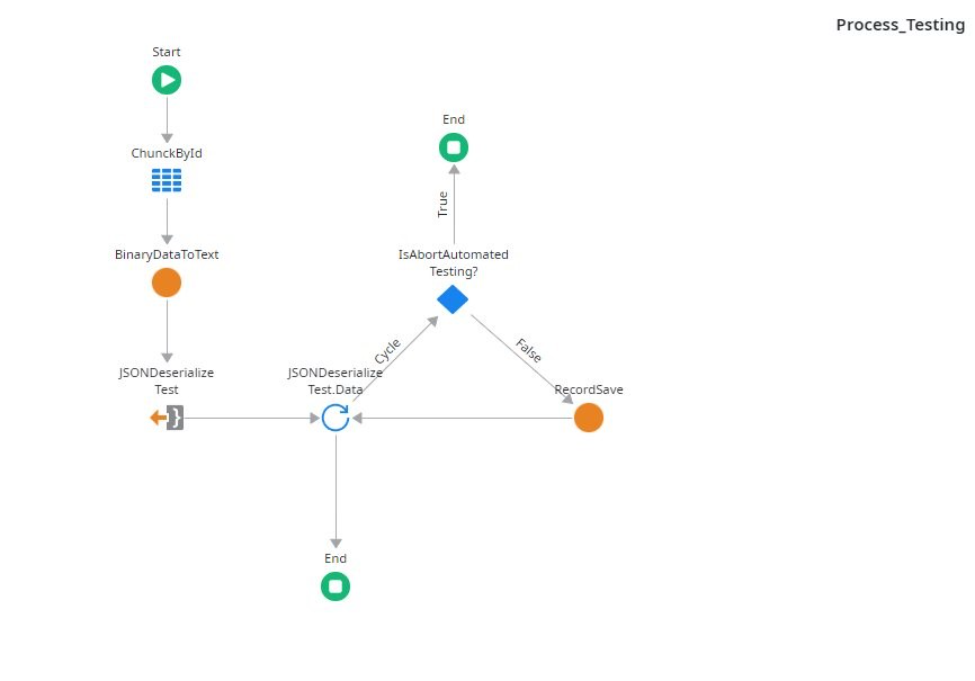
Step 4 — Process_Testing BPT: Retrieve, Deserialise & Save Each Record
Each Process_Testing instance receives the ChunkId as its launch parameter (passed automatically from the On Create event). The BPT Process flow:
- ChunckById — an Aggregate fetches the Chunk Entity record for this specific ChunkId
- BinaryDataToText — converts the stored binary/blob data back to a text string
- JSONDeserialize Test — deserialises the JSON text into a typed list of test records
- JSONDeserialize Test.Data For Each loop — iterates over every deserialized test record
- IsAbortAutomatedTesting? Decision — checks the abort flag at the start of every iteration: True → exits immediately via End (no further records processed); False → proceeds to RecordSave
- RecordSave — saves the test result as a TestResult Entity record and cycles back to the next record
Screenshot 5 — Process_Testing BPT Process Flow — The BPT Process flow: Start → ChunckById (Aggregate) → BinaryDataToText → JSONDeserialize Test → JSONDeserialize Test.Data For Each loop → IsAbortAutomatedTesting? Decision (True = End immediately; False = RecordSave → Cycle back to loop). Each Process_Testing instance runs independently in parallel for its assigned chunk.
4. Results & Impact
| Metric | Before (Server Action) | After (BPT Processes) |
| Error shown to user | Connection timeout on Screen | No error — fully async in background |
| Records processed | 0 (timeout before any writes) | All records across all chunks |
| Execution model | Synchronous Server Action | Async BPT Process per 100-record chunk |
| Parallelism | None — sequential For Each | All Process_Testing instances run in parallel |
| Progress visibility | None — Screen blocked/timed out | JS setInterval polls remaining every 5s |
| Abort capability | None — browser refresh required | IsAbortAutomatedTesting? flag + clearInterval |
| OutSystems monitoring | Service Center error logs only | Process instances visible in SC > Processes |
| Entity data integrity | No writes — timeout rolls back | Per-chunk commits — atomic per BPT Process |
5. Key Learnings & OutSystems Best Practices
- Never process large datasets inside a synchronous OutSystems Server Action — use BPT Processes or Timers for any bulk operation.
- The Entity On Create event is the cleanest BPT fan-out pattern: saving N Chunk Entity records automatically launches N Process_Testing instances via the Scheduler Service.
- Cleaning up previous run data (DeleteAllTestRecord + DeleteAllChunkByUser) at the start of TestByBPT ensures no stale data from failed runs affects results.
- Using Site.chunksize as the chunk threshold instead of a hardcoded value allows tuning without redeployment — 100 records per chunk was optimal for this use case.
- A JavaScript setInterval node calling a lightweight RefreshGetRemaining Server Action (two Aggregates) is a simple, WebSocket-free way to display live progress on a Reactive Screen.
- The IsAbortAutomatedTesting? Decision node at the top of the BPT For Each loop is the correct abort pattern — the current record finishes before exit, preventing partial writes.
- Serialising the chunk record list as JSON (BinaryDataToText + JSONDeserialize) keeps the Chunk Entity lean while allowing the BPT Process to fully reconstruct the record set.
- Monitor all Process_Testing instances in Service Center > Monitoring > Processes to observe parallel execution and diagnose any failed Automatic Activity.
6. Conclusion
By replacing a single blocking OutSystems Server Action with a BPT Process-based chunk architecture, the automated test Screen was transformed from a fragile, timeout-prone tool into a robust, scalable platform. The OutSystems Scheduler Service runs all Process_Testing instances in parallel — eliminating timeouts entirely. The JavaScript setInterval / Aggregate counter gives users real-time feedback, and the IsAbortAutomatedTesting? flag provides clean, graceful cancellation — all implemented natively within OutSystems.
✅ Solution Summary
Problem: Server Action caused ‘The connection has timed out’ on the test Screen
Step 1: On button click → IsLoadingPopUp + StartSetInterval JS node + TestByBPT Server Action
Step 2: setInterval every 5s → $actions.RefreshGetRemaining() → Aggregate countdown on Screen
Step 3: TestByBPT → DeleteAllTestRecord + DeleteAllChunkByUser → For Each → IsChunkCompleted?
→ ChunkSave (full chunks) / ChunkSave2 (final partial) → On Create triggers BPT Process
Step 4: Process_Testing → ChunckById Aggregate → BinaryDataToText → JSONDeserialize →
For Each → IsAbortAutomatedTesting? (True=End / False=RecordSave) → Cycle
Result: Zero timeouts | parallel BPT execution | live countdown | graceful abort