

Introduction
While working on an XML integration requirement in OutSystems, I implemented multiple solutions related to processing large and complex XML files. The XML structure contained nested objects, multiple lists, document metadata, and large binary content, which made the implementation increasingly difficult to maintain and debug.
Although OutSystems provides extensions for XML processing, handling deeply nested structures and large document data introduced several issues during XML-to-JSON conversion and deserialization. This case study highlights the key technical challenges faced during the implementation, the root causes identified, and the solutions used to build a cleaner, scalable, and more reliable XML processing workflow in OutSystems.
Project Requirement
The requirement involved:
- Reading and processing large XML files
- Extract and store data into multiple entities
- Handling deeply nested XML structures
- Extracting document information and binary content
- Converting XML data into structured entities
- Supporting multiple object hierarchies and collections
- Ensuring stable deserialization and maintainability
Initially, the implementation used the OutSystems XML extension directly to read XML nodes and map values into entities. However, as the XML complexity increased, multiple issues started appearing.

Case 1: Complex XML Parsing Logic Using XML Extension
Problem
OutSystems provides an XML extension for extracting XML node data. While it works well for smaller XML structures, processing highly nested XML files introduced major challenges.
The XML files contained:
- Multiple nested objects
- Lists inside objects
- Lists inside lists
- Deep hierarchical structures
- Multiple repeating nodes
Using only XML extension methods resulted in:
- Very long implementation flows
- Large numbers of XML node extraction actions
- Difficult debugging and maintenance
- Reduced readability of server actions
As the XML structure expanded, maintaining the implementation became increasingly difficult.
Solution Architecture
To simplify the processing logic, I changed the implementation approach completely.
Instead of manually traversing every XML node:
New Processing Flow
- Convert XML text into JSON
- Deserialize JSON into OutSystems structures
- Save structured data into entities
The XML was converted into JSON using the XmlToJson extension.

Important Technical Considerations
Structure Matching
The OutSystems structure must exactly match the XML/JSON hierarchy.
Important considerations:
- Structure names are case-sensitive
- Attribute names must match correctly
- Collections must be configured properly
- Nested lists must follow the same hierarchy
Even a small naming mismatch can cause deserialization failures.

Benefits of This Approach
After shifting from manual XML traversal to JSON deserialization:
- Logic became significantly cleaner
- Debugging became easier
- Maintenance effort was reduced
- Entity mapping became more structured
- Future XML changes became easier to support
This approach improved both scalability and developer productivity.

Case 2: Same Name Conflict During XML to JSON Conversion
Problem
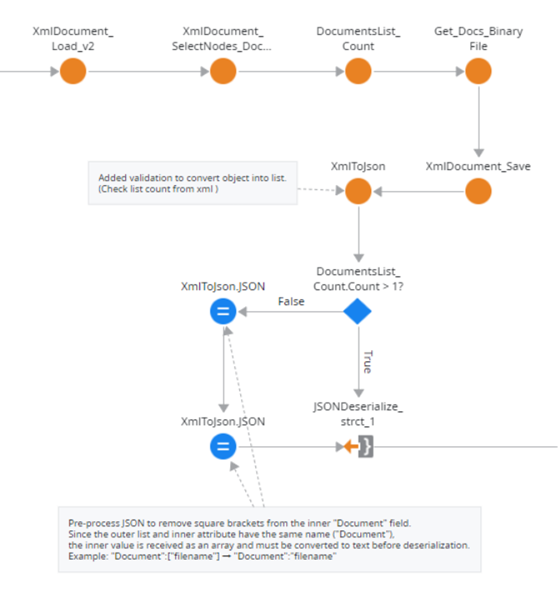
One of the XML nodes contained the same name for both the parent node and the inner value:
“Document”: [“SUM-2016-1215-900089.pdf”]
However, the structure created in OutSystems expected the value in text format:
“Document”:”SUM-2016-1215-900089.pdf”
During deserialization, this mismatch caused runtime failures because OutSystems interpreted the value as an array instead of a single text value.
Error Impact
- JSON deserialization failures
- Data mapping interruptions
- Increased debugging complexity
- Inconsistent behavior across document records

Root Cause Analysis
The issue occurred because the XML to JSON conversion process interpreted the repeated naming pattern as a collection.
Since both the node and inner value used the same name (Document), the converter automatically wrapped the value inside square brackets ([]) and generated an array.

Solution Implemented
Instead of redesigning all structures and modifying multiple dependent flows, I implemented a targeted preprocessing solution before deserialization.
The generated JSON text was cleaned using string replacement:
Replace(Json, ‘”Document”:[“‘, ‘”Document”:”‘)
The closing array brackets were also removed accordingly.

Result
After implementing this fix:
- JSON deserialization completed successfully
- Existing structures remained unchanged
- No additional refactoring was required
- The solution became stable without impacting other modules

Case 3: XmlToJson Failing Due to Large Binary Content
Problem
Another critical issue appeared while converting XML files containing binary document data.
The XML included document nodes containing large encoded binary values.
When these large values were passed directly into the XmlToJson extension, the conversion process failed repeatedly.
Observed Issues
- XmlToJson conversion failures
- Performance degradation
- Timeout risks
- Increased memory usage

Solution Strategy
To solve this issue, I implemented a preprocessing mechanism to separate binary data before converting the XML into JSON.
The approach involved extracting binary content first, storing it separately, and removing it temporarily from the XML.

Binary Extraction Workflow
Step 1: Fetch Document Nodes
The first step was retrieving all document nodes from the XML.
Actions Used
- XmlDocument_SelectNodes
Inputs
- XPathString
- XmlDocument
Output
- XmlNodeList (Object Type)

Step 2: Count XML Nodes
The total number of document nodes was identified using:
- XmlNodeList_Count
This count was later used for looping through the nodes.

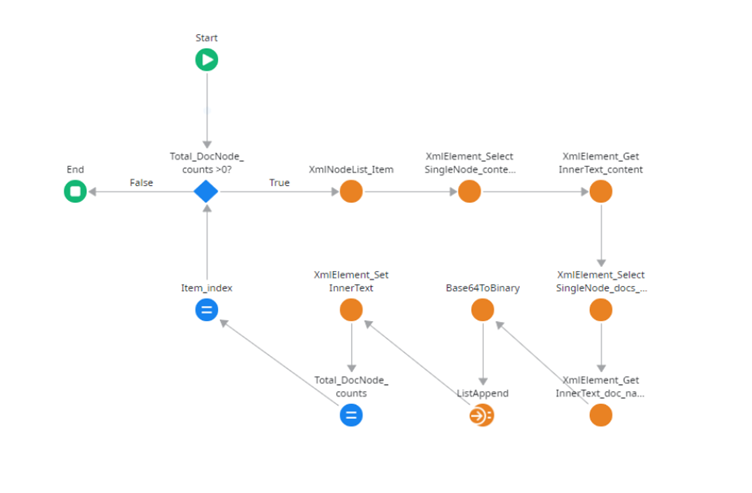
Step 3: Iterate Through XML Nodes
A manual loop using an index variable was implemented.
A normal For Each loop could not be used because the XML node list returned an object type.
Actions Used
- XmlNodeList_Item
- XmlElement_SelectSingleNode
- XmlElement_GetInnerText
Process
- Retrieve node using index
- Select binary attribute node
- Extract binary value
- Store value inside a structure
At this stage, all binary data was safely stored separately.
Step 4: Remove Binary Content From XML
Once the binary data was extracted, the original XML node value was cleared.
Action Used
- XmlElement_SetInnerText
This significantly reduced the XML payload size.

Step 5: Save Updated XML
Finally, the updated XML document was regenerated using:
- XmlDocument_Save
The cleaned XML was then passed into the XmlToJson extension.
Since the large binary values had already been removed, the conversion process completed successfully.

Final Outcome
After implementing these improvements:
Technical Improvements
- Stable XML to JSON conversion
- Successful deserialization of large XML files
- Reduced processing failures
- Better memory handling
- Cleaner integration logic

Development Improvements
- Easier maintenance
- Reduced implementation complexity
- Better scalability for future XML formats
- Improved readability of server actions
- Faster issue resolution during testing

Key Learnings
This implementation reinforced several important lessons while working with enterprise integrations in OutSystems:
- XML parsing logic can become difficult to maintain for deeply nested structures
- Converting XML into JSON simplifies deserialization significantly
- Binary data should be handled separately during transformation processes
- Naming conflicts can create unexpected array behavior during conversion
- Provide JSON structure and its attributes names in ‘Name in JSON’ field
- Small preprocessing fixes can sometimes be more effective than large-scale refactoring

Extensions Used
- XML Extension
- XmlToJson Extension

Conclusion
By optimizing XML preprocessing, JSON conversion, and deserialization handling, I was able to build a cleaner and more scalable XML processing workflow in OutSystems. These improvements simplified debugging, improved maintainability, and increased overall integration stability.