
Replacing emails, Excel sheets and HR walk-ins with one role-based application that employees carry in their pockets
Industry: Enterprise HR Technology
Platform: OutSystems 11 (O11)
Technology: Responsive Desktop Web & Mobile Application, Role-Based Access
Prepared by: Mobile Application Developer, TickTrack Team
1. Executive Summary
This case study documents the end-to-end design and development of TickTrack, an HR and timesheet portal built on the OutSystems 11 (O11) platform and delivered as both a desktop web application and a mobile application. TickTrack brings timesheets, leave, work-from-home, comp-off, asset requests, holidays, birthdays and employee records into a single place.
Before TickTrack, each of these lived in a different channel: emails to HR, hand-made Excel sheets, a holiday list shared once on Teams, and walk-ins to the HR desk. The web application was built by our team. Once it was live, I took on the mobile application myself, from research and wireframes through UI design and development, so that employees could do everything on their phone too. The result is an application where employees help themselves and HR approves everything from one console.
| Outcome: Every routine HR interaction, from checking a leave balance to filling a timesheet, moved from emails and spreadsheets into one application available on desktop and mobile. Employees get instant, self-service answers and email notifications on every decision. HR gets one queue for approvals and a complete history for every employee. |
2. Background & Business Context
2.1 The Organisation
The organisation relies on its HR team to manage employee requests and records, and on its employees to log their working time accurately. As the team grew, HR became the middle layer for almost every small question, and manual processes did not scale with it.
2.2 The Challenge
Day-to-day HR work was slow, scattered and invisible. Employees and HR were working around the lack of a system rather than with one:
- Leave balances: employees had to go to HR just to find out how many leaves they had left.
- Leave approvals: applying meant writing an email to HR and waiting for a reply on the same thread.
- Timesheets: every employee created an Excel sheet by hand and emailed it over.
- Asset requests: requested by email or by walking up to HR in person.
- Holidays: the full-year list was shared once on Teams and quickly got buried, so planning leave around holidays was guesswork.
- Birthdays: nobody was notified, so celebrations depended on someone remembering.
- Records: HR had no single place to see an employee’s leave or timesheet history.
2.3 Why OutSystems 11?
OutSystems 11 is a low-code platform that suits an internal product like this, where web and mobile experiences must share the same logic and data and where role-based security is central. Building on O11 let the team deliver the web application and then extend it to mobile on the same platform, keeping the experience and the role-based rules consistent between the two.
3. Solution Overview
3.1 One Portal, Two Roles
TickTrack is built around role-based access. What a person sees and can do after logging in depends entirely on their role:
| Role | What they can do | What they never see |
| Employee | Fill timesheets, including from the phone Apply for leave, WFH and comp-off; request assets Track leave balance and request status View calendar, holidays, birthdays, profile and personal information | HR approval screens, other employees’ records, admin configuration |
| HR | Approve or reject leave, WFH, comp-off, timesheets and assets View every employee’s leave and timesheet history Create new employees Set and manage holiday data | Nothing is hidden, but actions are limited to HR responsibilities |
3.2 Module Overview
| Module | Employee experience | HR experience |
| Dashboard | Upcoming holidays and birthdays at a glance right after login | Overview of pending requests |
| Timesheet | Fill and submit weekly time from desktop or mobile | Review, approve or reject with full history |
| Leave / WFH / Comp-off | Apply, track status, check balance | Approve or reject, track every employee’s history |
| Assets | Raise a request in the app | Approve and track requests |
| Calendar & Holidays | See the year’s holidays and plan leave | Create and maintain holiday data |
| Profile | View personal information | Create and manage employee records |
| Notifications | Emails on every approval or rejection, and birthday mails | Birthday alerts for the team |
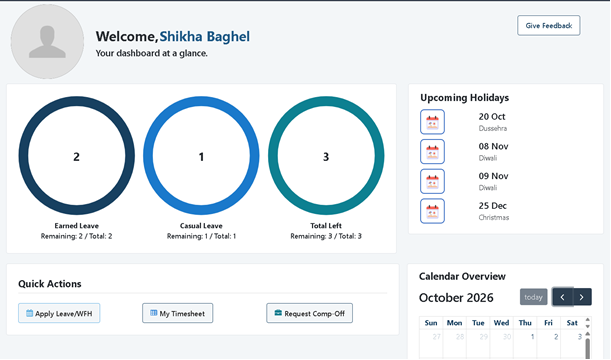
Figure 1: TickTrack dashboard showing upcoming holidays and birthdays
4. Team Effort and My Role: Taking TickTrack to Mobile
TickTrack was a team project. The team built the web application first. After it was delivered, I developed its mobile application end to end, and I worked on it in four phases.
| Part of TickTrack | Who built it |
| Web (desktop) application | Built by the TickTrack team |
| Mobile application | Developed by me: research, wireframes, UI design and development, with the same role-based access |
Phase 1: Research
I started from how requests moved before TickTrack (email threads for leave, Excel timesheets, the Teams holiday list, walk-ins for assets) and from the web application the team had already delivered. I focused on which tasks employees would want to do on the go, such as filling a timesheet, applying for leave or checking a balance, because those became the heart of the mobile app.
Phase 2: Wireframes
I mapped the mobile screens and the journey between them, deciding early what an employee should see immediately after login and how each request could be completed in a few taps. I kept the flows consistent with the web application so that people moving between the two would feel at home.
Phase 3: Design
Design focused on one rule: a person should be able to complete a task quickly and without training. I designed a clean, touch-friendly interface with the most-used actions, such as filling a timesheet or applying for leave, within easy reach, and with the look and behaviour of the web application.
Phase 4: Development on OutSystems 11
I developed the mobile application on OutSystems 11 and delivered it to users. It carries the same role-based access as the web application, so employees and HR each land on the experience meant for them, and it works with the same data and notifications.
5. Key Features in Detail
A dashboard that answers questions before they’re asked
The moment an employee logs in, they see upcoming holidays and birthdays at a glance. Employees plan their leave around holidays without searching for a file, and nobody misses a colleague’s birthday.
Timesheets without Excel
Employees fill their timesheet inside TickTrack, from the desktop or the phone, instead of building a spreadsheet and emailing it. HR approves or rejects it in the same system, and the history stays on record.
Leave, WFH and comp-off in one flow
Employees apply in the app, track the status, and check their balance whenever they like. Leave balances no longer need an HR visit, and approvals no longer depend on a mail thread.
Asset requests with a paper trail
Requesting equipment is now a request inside the portal with a visible status, instead of an email or a conversation at the HR desk.
An HR console that keeps everything in one place
HR approves every request type from one place, can see the complete leave and timesheet history of any employee, creates new employees, and sets the holiday data that every employee sees.
Notifications that close the loop
Employees receive an email whenever their timesheet, leave, WFH, asset or comp-off request is approved or rejected. TickTrack also sends birthday mails to the employee and notifies colleagues about another employee’s birthday, a small touch that gave a utility tool some personality.
Figure 2: Mobile timesheet and leave screens
6. Results & Outcomes
| Area | Before TickTrack | After TickTrack |
| Leave balance | Ask HR in person | Visible to the employee at any time |
| Applying for leave, WFH, comp-off | Write an email and wait for a reply | Apply in the app and track the status |
| Timesheets | Hand-made Excel sheet sent by email | Filled in the app, from desktop or mobile |
| Asset requests | Email or walk-in to HR | Request raised and tracked in the app |
| Holidays | Year list shared once on Teams | Always on the dashboard; set by HR in one place |
| Birthdays | No notification | Birthday mails and teammate alerts |
| Decision updates | Buried in inboxes | Instant email on approval or rejection |
| Employee history | Scattered across mails and files | Complete leave and timesheet history for HR |
| Access | Email only | Role-based desktop and mobile access |
6.1 Impact
- Self-service replaced dependency. Employees stopped going to HR for information they can now see themselves, giving HR time back.
- Approvals became traceable. Every request has a status, a decision and a notification, instead of living in someone’s inbox.
- Better planning. With holidays on the dashboard, employees plan leave around them.
- Work moved to where people are. Mobile access means a timesheet or a leave request no longer waits for a laptop.
- A warmer workplace. Birthday notifications gave the whole team a small, regular moment of connection.
- One source of truth. HR now works from a single, role-protected system rather than a collection of emails and files.
| Note: Quantified results such as time saved per approval, adoption rate or share of timesheets filled on mobile can be added here once measured. |
7. Key Lessons Learned
7.1 Start from the questions people keep asking
The features that mattered most came directly from repeated questions: How many leaves do I have? Is there a holiday next week? Was my request approved? Designing around them kept the product focused.
7.2 Design roles first, screens second
Deciding clearly what an employee and what HR should see and do made the interface simpler for both. Role-based access is a design decision as much as a security one.
7.3 Mobile is not a smaller desktop
Designing the mobile app around the tasks people do on the go, rather than shrinking the web screens to fit, made frequent actions like timesheets and leave requests feel natural on a phone.
7.4 Notifications turn a tool into a habit
An email on every decision removed the need to keep checking, and the birthday messages gave people a reason to stay connected to the product.
7.5 Building on a team’s foundation
Extending a web application my team had already delivered meant the mobile app could reuse proven rules and data, so I could concentrate on the experience. Owning the mobile journey from research to release also meant no design decision was lost along the way.
8. Recommendations & Next Steps
- Reports and dashboards for HR covering leave trends, timesheet compliance and attendance patterns.
- Push notifications on mobile for pending approvals and timesheet reminders.
- Payroll and billing integration using approved timesheet and leave data.
- Self-service document and policy access so employees can find HR policies in the same place.