
Secure Employee Access Management Using OutSystems
Reactive Application
Developed By
Anurag Malviya
1. Project Overview
The Employee_Management_Case_Study application was developed using OutSystems Reactive Web Application technology to manage employee information through a centralised and user-friendly system.
The application allows users to:
• View employee records
• Search employee information
• Navigate to employee detail pages
• Update employee details
• Manage department-related employee data
• Handle employee status and records efficiently
The primary objective of the application was to create a scalable and responsive employee management solution while implementing enterprise-level security practices for secure data handling.
2. Business Requirement
The organization required a centralized employee management solution that could:
• Maintain employee records in a structured format
• Provide quick employee search functionality
• Allow easy navigation to employee detail pages
• Improve operational efficiency
• Reduce manual record handling
• Ensure secure access to sensitive employee information
The application also needed to maintain data confidentiality and prevent unauthorised access to employee records through manipulated URL parameters.
3. Application Features
Core Features
• Employee Listing Screen
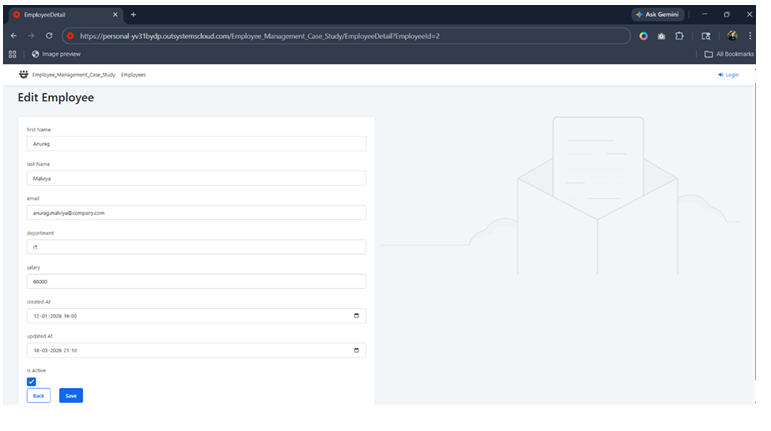
• Employee Detail Screen
• Employee Search Functionality
• Employee Record Update
• Department Management
• Responsive Reactive UI
• Pagination Support
• Form Validation
• Secure Navigation Handling
• URL Parameter Encryption & Decryption
• Role-Based Access Validation
4. Application Workflow
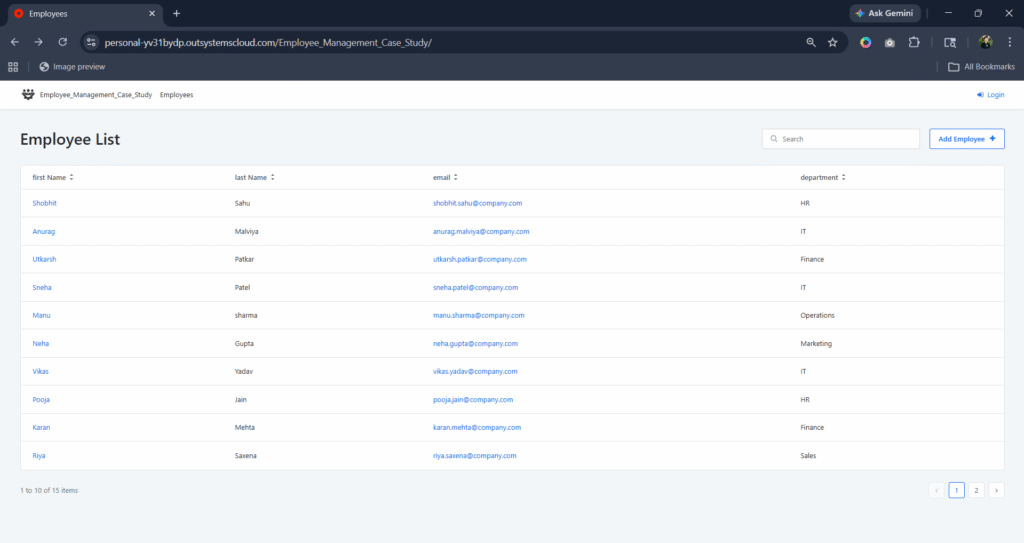
Employee Listing Screen The Employee List screen displays all employee records in a tabular format with:
• Employee Name
• Department
• Search Capability
• Pagination
• Employee Navigation
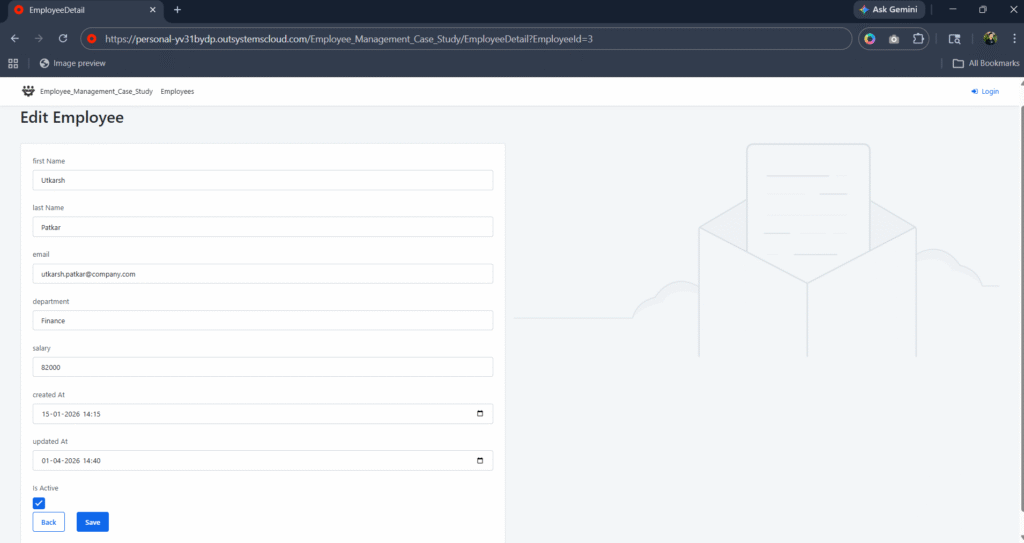
Users can click on any employee record to navigate to the Employee Detail screen. Employee Detail Screen The Employee Detail screen allows users to:
• View employee details
• Update employee information
• Manage employee status
• Edit department and salary details
The screen retrieves employee information dynamically based on the employee identifier passed through the URL.
5. Major Security Challenge Identified
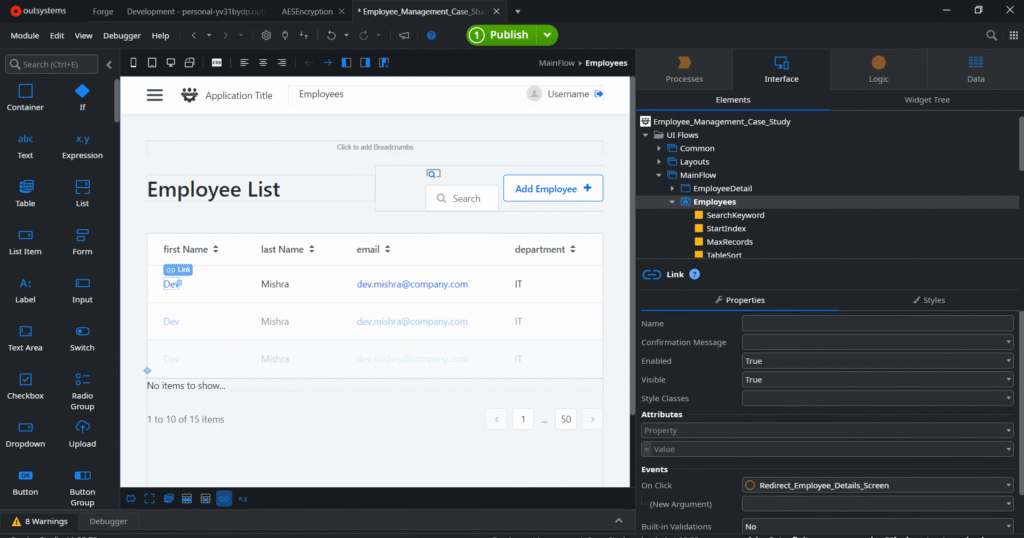
During development, one of the identified security concerns was exposing internal entity identifiers directly in URL parameters. Initially, when a user clicked on an employee record from the Employee List screen, the application redirected to the EmployeeDetail screen using a direct EmployeeId parameter in the URL.
Example:
Before Security Implementation:
/EmployeeDetail?EmployeeId=2
This approach created a significant security risk. Since the EmployeeId was directly visible in the browser URL, users could manually modify the parameter value and access details of other employees without proper authorization.
For example:
• Changing EmployeeId=2 to EmployeeId=3
• Accessing unauthorized employee records
• Viewing sensitive employee information
• Attempting entity enumeration
• Manipulating URL parameters for unauthorized data access
This exposed the application to:
• Unauthorized Data Access
• URL Tampering
• Direct Entity Enumeration
• Sensitive Data Exposure
• Security Vulnerabilities in Navigation Flow
The issue became more critical as employee-related information such as salary, department, and personal details were accessible through manipulated URL parameters.
6. Security Solution Implementation
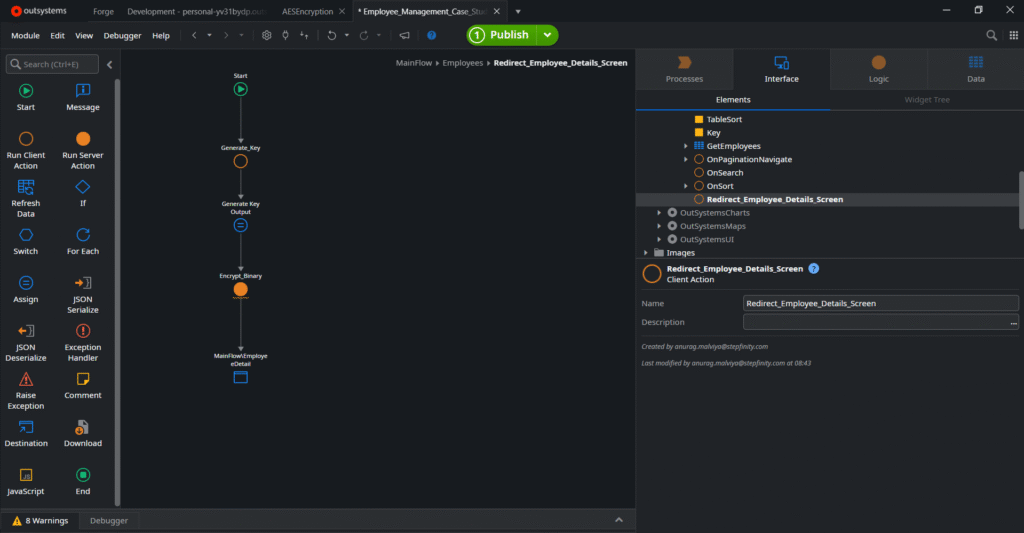
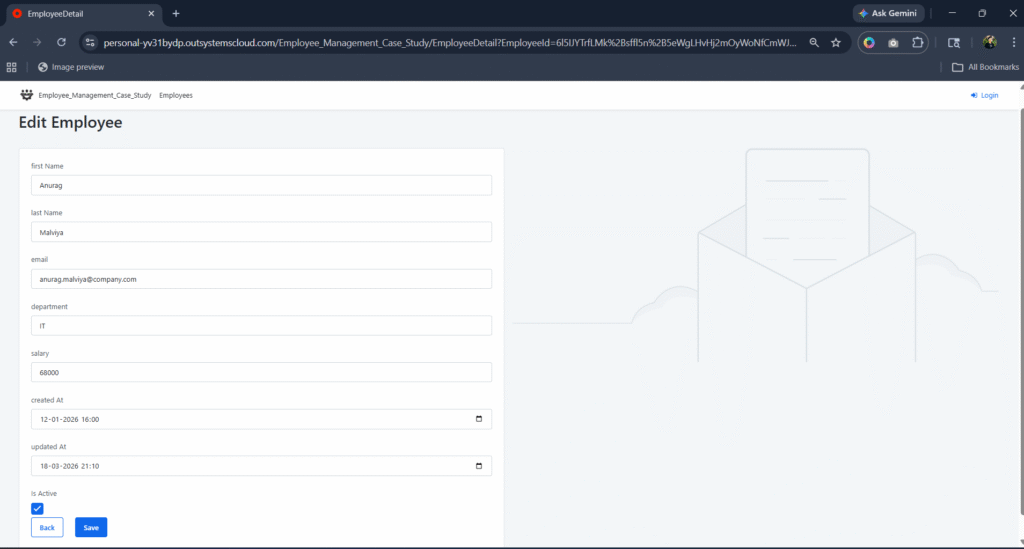
To overcome this security challenge, a secure URL parameter handling mechanism was implemented using Encryption and Decryption. Instead of exposing the direct EmployeeId in the URL, the employee identifier was encrypted before navigation.
Example:
After Security Implementation:
/EmployeeDetail?EmployeeId=6I5JYTrfLMk%2BsffI5n%2B5eWgLHvHj2mOyWoNfCmWJHb9jZe
NYpa9twQQWPwh91aoSUVQ08sBO%2B%2BCEsnS3wcuSQ%3D%3D
This ensured that:
• Internal entity identifiers were no longer exposed publicly
• Users could not manually identify record IDs
• URL manipulation became significantly more difficult
• Sensitive business data remained protected
• Unauthorized record access risk was minimized
The encrypted identifier was decrypted only at the server-side processing layer after validation. Additional authorization checks were implemented to ensure that users could access only permitted employee records based on business logic and access permissions.
7. Security Challenge & Solution
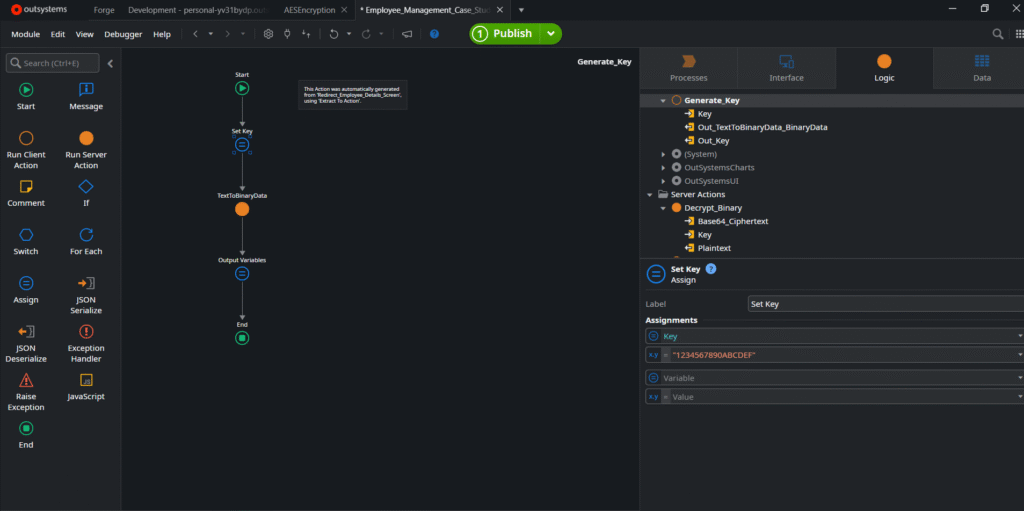
During development, one of the identified security concerns was exposing internal entity identifiers directly in URL parameters. Certain application screens were passing record IDs through query parameters for navigation and detail page access.
This created a potential security and data exposure risk where users could manipulate URL parameters manually and attempt unauthorized access to records by changing entity IDs. It also increased the possibility of entity enumeration and unintended data visibility.
To address this issue, a secure identifier handling mechanism was implemented. Sensitive identifiers passed through URLs were encrypted before navigation and decrypted only at the server-side validation layer during processing. Additional authorization validation was implemented to ensure users could only access records permitted by their assigned roles and business permissions. This approach significantly improved application security by preventing direct exposure of internal entity references and reducing the risk of URL tampering.
8. Security Implementation Workflow
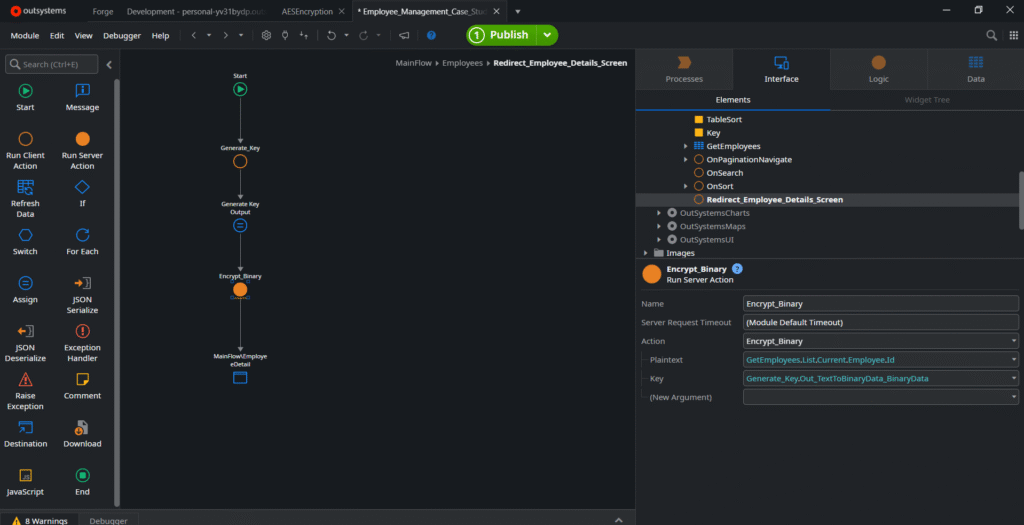
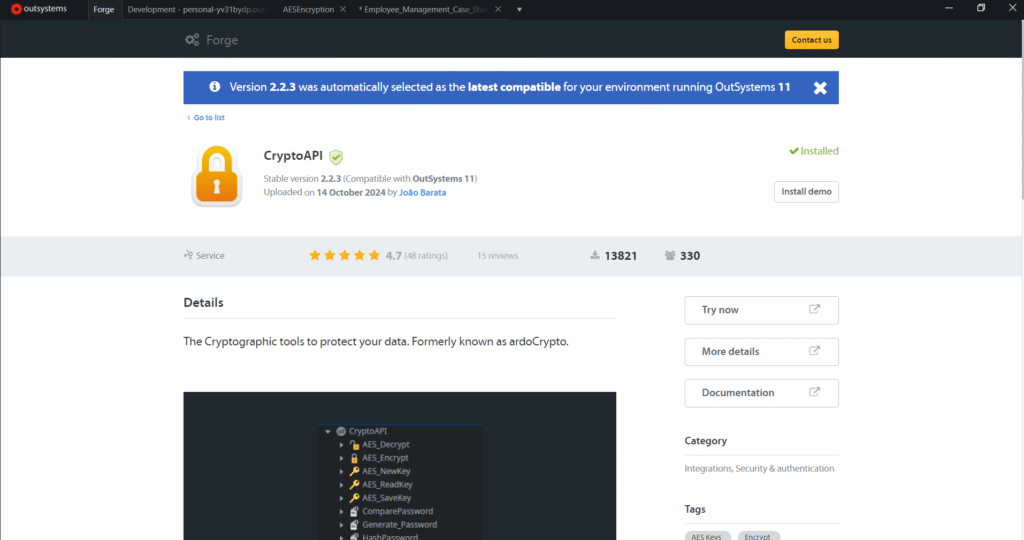
Secure Navigation Flow To implement secure employee navigation and prevent direct exposure of EmployeeId values in URLs, a complete Encryption & Decryption mechanism was implemented inside the application.
The implementation flow works as follows:
Step 1 – Employee Navigation
When a user clicks on any employee record from the Employee List screen, the application triggers the Redirect_Employee_Details_Screen action.
This action is responsible for securely preparing the EmployeeId before redirecting the user to the EmployeeDetail screen.
Step 2 – Generate Secure Encryption Key
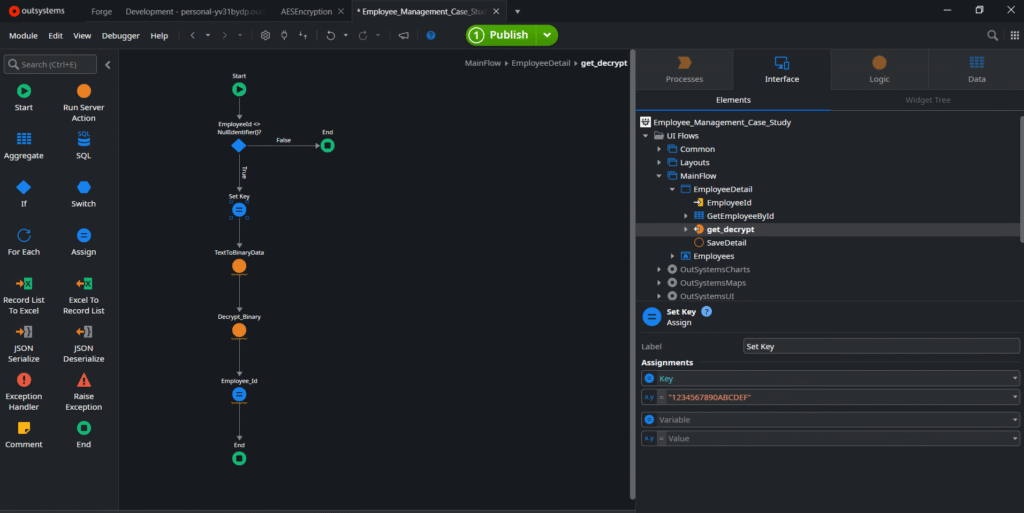
Inside the Redirect_Employee_Details_Screen action, a Generate_Key client action is executed. The Generate_Key action creates a secure binary key that is used during the encryption process.
Purpose of Generate_Key:
• Generate secure binary encryption data
• Create dynamic encryption support
• Prevent direct exposure of raw entity identifiers
• Improve navigation security
Step 3 – Encrypt Employee Identifier
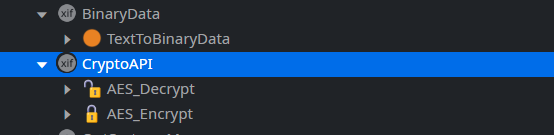
After generating the binary key, the Encrypt_Binary server action is executed.
The Encrypt_Binary server action converts readable EmployeeId values such as:
• Integer
• Text
• Identifier values
into encrypted ciphertext.
Example:
Before Encryption:
EmployeeId=2
After Encryption:
EmployeeId=6I5JYTrfLMk%2BsffI5n%2B5eWgLHvHj2mOyWoNfCmWJHb9jZeNYpa9twQQWPwh
91aoSUVQ08sBO%2B%2BCEsnS3wcuSQ%3D%3D
This encrypted value becomes unreadable and prevents users from identifying internal entity
IDs.
Step 4 – Secure Redirection
After successful encryption, the application redirects the user to the EmployeeDetail screen while passing the encrypted EmployeeId as a URL parameter.
This ensures that:
• Direct IDs are hidden
• URL tampering becomes difficult
• Internal entity identifiers remain protected
• Sensitive employee records are more secure
Step 5 – EmployeeDetail Screen Decryption Process
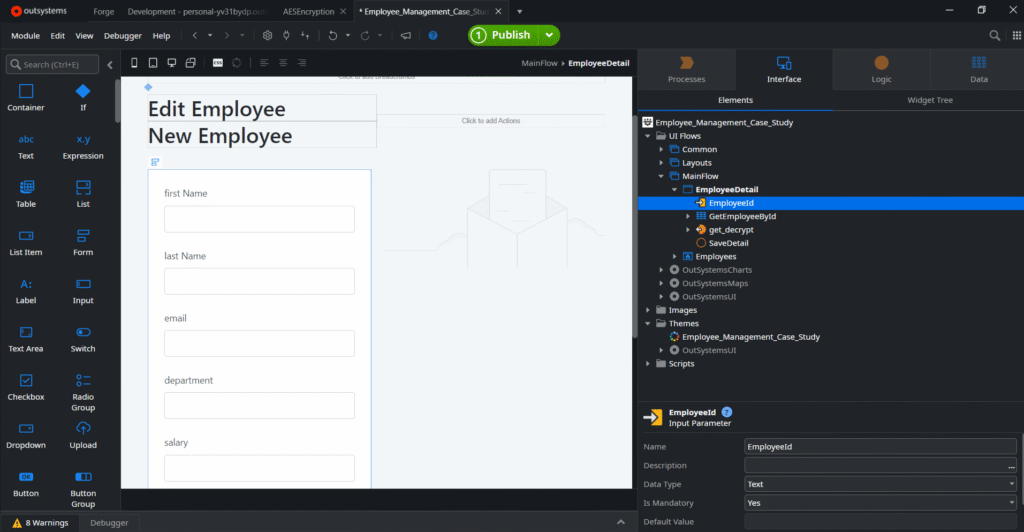
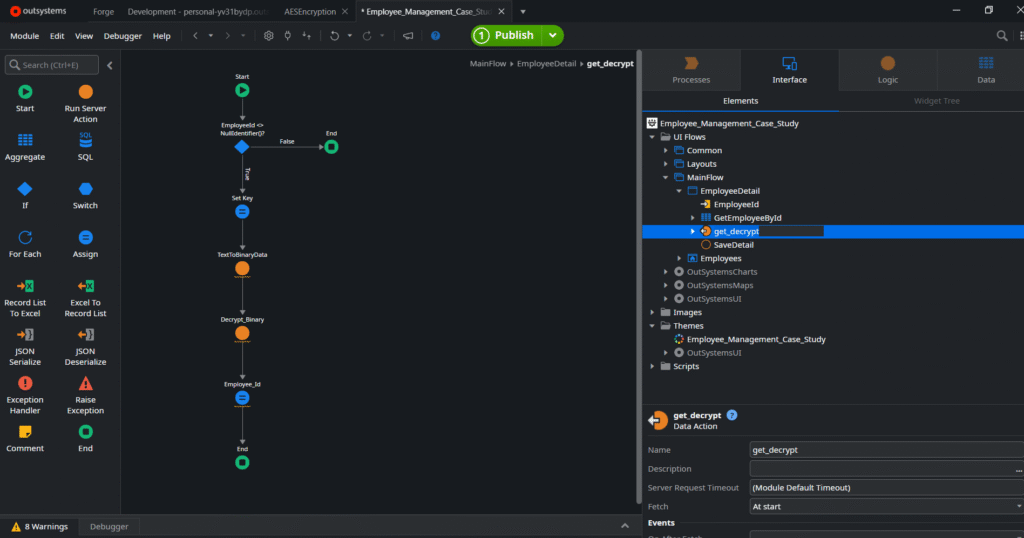
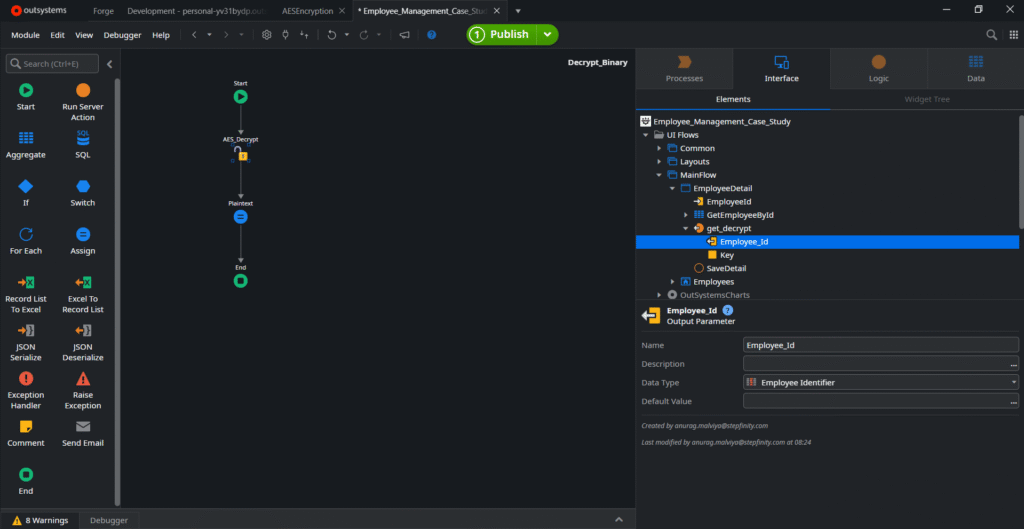
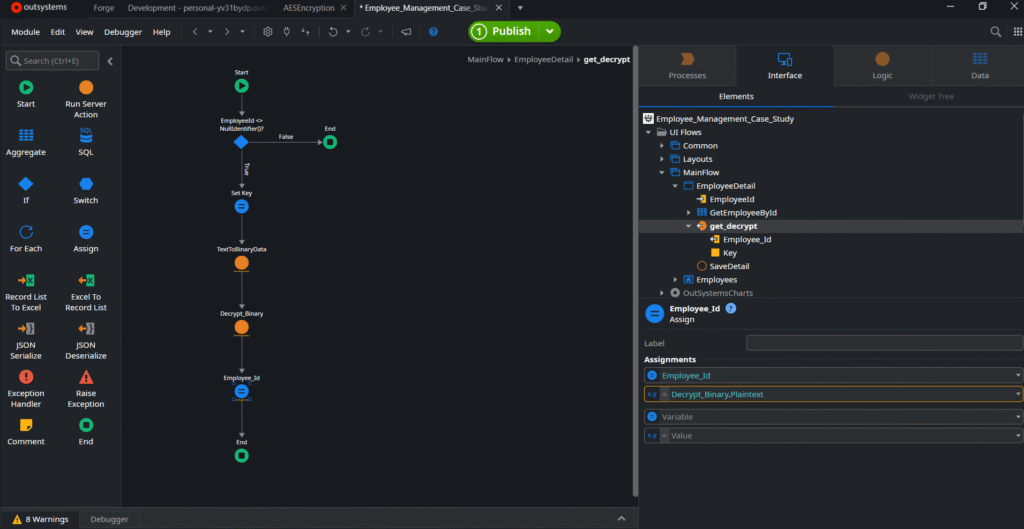
Inside the EmployeeDetail screen, the Input Parameter datatype was changed from Integer to Text. This change was required because encrypted values are passed as ciphertext strings instead of direct integer IDs. Before Screen Load: A Data Action named Get_Decrypt executes automatically before the screen loads.
The responsibility of Get_Decrypt is to:
• Receive encrypted EmployeeId text
• Execute the decryption flow
• Convert encrypted text into readable plaintext
• Prepare the original EmployeeId for business processing
Step 6 – Decrypt_Binary Server Action
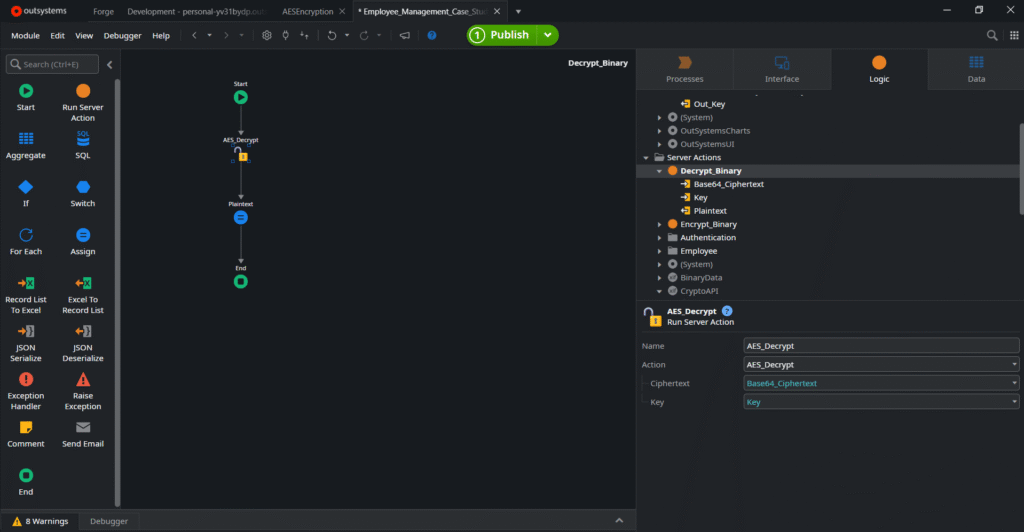
Inside the Get_Decrypt Data Action, the Decrypt_Binary server action is executed.
The Decrypt_Binary action converts encrypted ciphertext back into plaintext EmployeeId
values.
Example:
Encrypted Text:
6I5JYTrfLMk%2BsffI5n%2B5eWgLHvHj2mOyWoNfCmWJHb9jZeNYpa9twQQWPwh91aoSUVQ0
8sBO%2B%2BCEsnS3wcuSQ%3D%3D
After Decryption:
EmployeeId=2
The decrypted EmployeeId is then used internally for:
• Employee retrieval
• Aggregate filtering
• Employee detail loading
• Update operations
• Business validation
Step 7 – Reusable Secure Data Handling
Instead of directly using the Input Parameter throughout the screen logic, the application uses the decrypted output parameter generated from the Get_Decrypt Data Action. This approach ensures:
• Centralized secure handling
• Consistent decryption workflow
• Reusable secure navigation logic
• Better maintainability
• Improved enterprise security standards
9. Technical Improvements Implemented
Security Enhancements
• URL Parameter Encryption & Decryption
• Server-side Validation
• Role-Based Authorization Checks
• Secure Navigation Handling
• Prevention of Direct Entity Enumeration
• Improved Data Access Security
Performance & Usability Improvements
• Reactive Web Application Architecture
• Search Optimization
• Pagination Handling
• Responsive UI Design
• Form Validation Handling
• Structured Employee Data Management
• Reusable UI Components
10. Technical Implementation Details
Technologies Used
• OutSystems Reactive Web Application
• Aggregates
• Client Actions
• Server Actions
• Form Validation
• URL Parameter Encryption
• Data Binding
• Reactive Screen Navigation
• Pagination
• Role-Based Access Logic
11. Application Screens Included
Employee List Screen
The Employee List screen displays all employees with search functionality and navigation
support.
Features:
• Employee Search
• Pagination
• Dynamic Employee Listing
• Employee Navigation
• Responsive Table Layout
Employee Detail Screen
The Employee Detail screen allows editing and managing employee information.
Features:
• Employee Detail Retrieval
• Dynamic Data Binding
• Employee Update Functionality
• Validation Handling
• Secure Data Access
12. Final Outcome
The implementation significantly improved the overall security posture of the application.
Key improvements achieved:
• Reduced risk of unauthorized data access
• Prevented direct exposure of internal entity identifiers
• Improved protection against URL tampering
• Enhanced security for employee-related sensitive data
• Improved application maintainability
• Better navigation security standards
• Improved enterprise-level security compliance
The encrypted URL handling mechanism aligned the application with secure enterprise
development practices and improved confidence in handling sensitive employee information.
13. Key Learnings
Through this implementation, the following technical and architectural learnings were achieved:
• Secure URL parameter handling
• Encryption & Decryption implementation in OutSystems
• Role-based access validation
• Reactive application state management
• Secure navigation design
• Enterprise application security practices
• Secure handling of sensitive business data
• Better understanding of access control implementation
14. My Contribution
Worked on:
• Employee Management Application Development
• Reactive UI Development
• Employee Search Functionality
• Employee Detail Management
• Security Enhancement Implementation
• URL Encryption & Decryption Logic
• Validation Handling
• Navigation Security
• Application Structure & Workflow Design
15. Conclusion
The Employee_Management_Case_Study application demonstrates the implementation of secure employee management functionality using OutSystems Reactive Web technology. A major focus of the project was identifying and resolving security vulnerabilities related to direct URL parameter exposure. By implementing encrypted URL handling and secure validation mechanisms, the application achieved improved protection against unauthorized access and entity manipulation. The project successfully combined responsive UI development, employee management functionality, and enterprise-level security practices to create a more secure and scalablebusiness application.