Industry: Warehouse Management and Logistics
Technology: OutSystems, AI Image Recognition, REST APIs, Mobile Plugins
Project Overview
Warehouse operations require accurate product identification, efficient inventory sorting, and real-time stock updates. Manual processes can slow down operations and increase the risk of inventory errors.
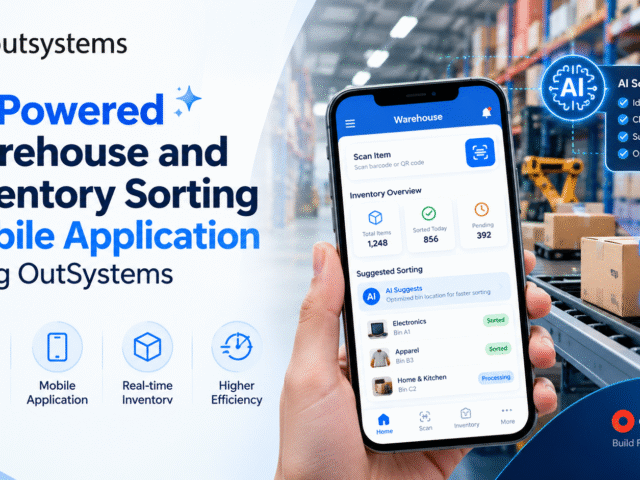
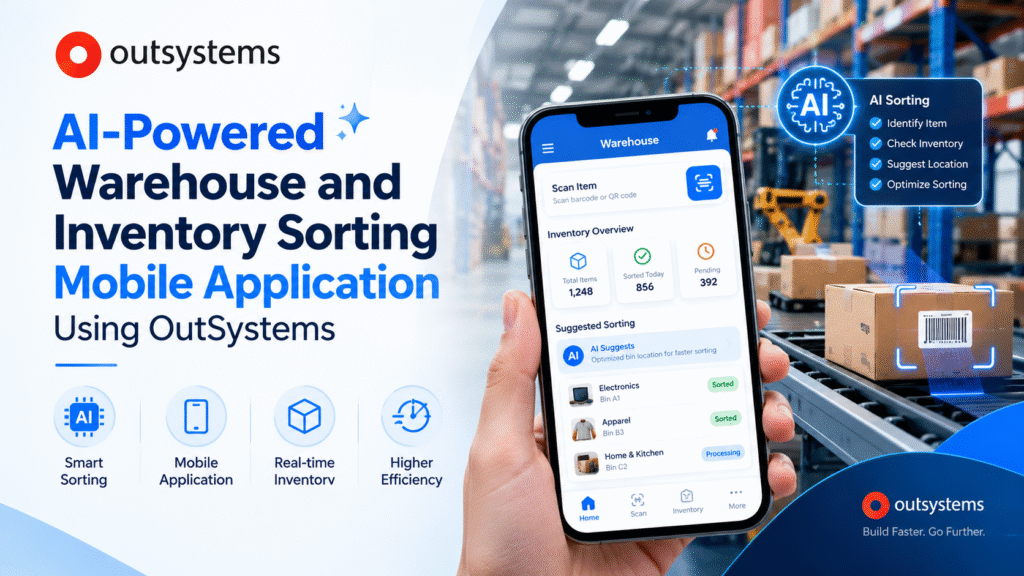
This case study explores a proposed AI-powered warehouse and inventory sorting mobile application developed using OutSystems. The solution combines mobile technology, AI image recognition, barcode scanning, and third-party integrations to simplify product sorting and inventory management.
The application enables warehouse employees to identify products, receive intelligent sorting recommendations, update inventory records, and monitor assigned tasks from a single mobile interface.
Business Challenges
Warehouse teams often face several operational challenges:
- Manual product identification: Identifying products individually can consume valuable time.
- Inventory inaccuracies: Incorrect categorization and manual data entry can lead to stock discrepancies.
- Limited visibility: Managers may struggle to monitor sorting progress and inventory status in real time.
- Inefficient workflows: Employees may rely on manual instructions to determine appropriate storage locations.
- Disconnected systems: Inventory databases, scanning devices, and warehouse management systems may operate separately.
The objective was to design a centralized mobile solution that supports faster sorting, consistent inventory records, and better operational visibility.
OutSystems-Based Solution
OutSystems provides a low-code development platform for building mobile applications, business workflows, and enterprise integrations.
The proposed application uses OutSystems to create a mobile-friendly interface connected to inventory data, external AI services, and warehouse systems.
Key features include:
- AI Image Recognition: Identifies possible product categories from images captured using the mobile camera.
- Smart Sorting Recommendations: Suggests appropriate product categories and storage locations using AI outputs, inventory information, and warehouse rules.
- Barcode and QR Code Scanning: Retrieves product information without requiring manual SKU entry.
- Inventory Management: Supports validated inventory updates and sorting status tracking.
- Push Notifications: Alerts employees about assigned tasks, discrepancies, and pending confirmations.
- Reporting Dashboard: Helps supervisors monitor sorting activities, inventory status, and operational performance.
AI and Third-Party Integrations
AI image recognition is a central component of the proposed solution. When a product requires identification, the employee captures an image and submits it to an external AI vision service through a REST API.
The service returns a predicted category and possible product matches. The application compares these results with available inventory records and barcode information.
A recommendation engine then suggests a suitable sorting category or storage location based on product attributes and warehouse rules. Employees can verify the recommendation before the inventory record is updated.
The application also integrates the following components:
- Barcode scanner plugin: Supports product identification and SKU retrieval.
- Mobile camera integration: Captures product images for AI analysis.
- Push notification service: Sends task updates and exception alerts.
- REST API integrations: Connects AI services, inventory databases, and Warehouse Management Systems (WMS).
Low-confidence predictions and conflicting product information are routed for manual verification to help maintain inventory accuracy.
Detailed User Workflow
The application follows a structured workflow from product identification to inventory reporting.
Step 1: Login and Dashboard
Employees securely log in and view assigned sorting tasks, pending activities, and inventory alerts.
Step 2: Product Scanning
The employee scans the product barcode or QR code. The application retrieves the available product and inventory details.
Step 3: AI Image Recognition
If additional identification is needed, the employee captures an image. The external AI service analyzes it and returns a predicted category or possible product matches.
Step 4: Sorting Recommendation
The application combines product information, AI results, and warehouse rules to recommend a sorting category or storage location.
Step 5: Employee Confirmation
The employee reviews and confirms the recommendation. Uncertain or incorrect results can be flagged for supervisor review.
Step 6: Inventory Update
OutSystems validates the submitted information and updates the relevant inventory system through its backend logic or APIs.
Step 7: Notifications and Reporting
Employees receive task updates, while supervisors monitor completed activities, pending exceptions, and inventory performance.
Workflow summary: Login → Scan Product → AI Recognition → Sorting Recommendation → Confirmation → Inventory Update → Notifications → Reporting.
Core User Roles
The application supports three primary user roles.
Warehouse Employee: Scans products, captures images, reviews AI recommendations, confirms sorting decisions, and reports inventory discrepancies.
Warehouse Supervisor: Assigns tasks, monitors sorting progress, reviews exceptions, and tracks operational KPIs.
System Administrator: Manages user permissions, configures sorting rules, maintains API integrations, and monitors application reliability.
Role-based access control ensures that each user can access only the functions authorized for their responsibilities.
Technical Architecture
The proposed architecture consists of four main layers:
- Mobile application: Built with OutSystems to provide the employee interface, scanning workflow, camera access, and task dashboard.
- Business logic: Handles inventory validation, user permissions, sorting rules, and exception management.
- Integration and AI layer: Connects external AI vision services, notification providers, and warehouse systems through REST APIs.
- Data and reporting layer: Stores or accesses inventory records, task history, sorting confirmations, and performance metrics.
This architecture supports integration with existing enterprise systems while allowing the application to evolve as warehouse requirements change.
Expected Benefits and Success Metrics
The proposed solution aims to reduce repetitive manual activities, improve inventory visibility, standardize sorting workflows, and support more informed warehouse decisions.
Success should be measured using defined KPIs, including:
- Average product sorting time
- AI classification accuracy
- Inventory record accuracy
- Manual intervention rate
- Barcode scanning success rate
- Sorting task completion rate
- API response time and failure rate
Baseline measurements should be collected before implementation and compared with pilot results. Actual improvements should be published only after they have been verified.
Conclusion
An AI-powered warehouse and inventory sorting mobile application built with OutSystems offers a practical approach to modernizing warehouse operations. By combining AI image recognition, intelligent recommendations, barcode scanning, camera integration, notifications, and enterprise APIs, businesses can establish a more connected and efficient sorting workflow.
Stepfinity helps businesses explore OutSystems-based digital solutions that integrate mobile applications, AI capabilities, and enterprise systems to address operational challenges.
Looking to modernize your warehouse operations? Contact Stepfinity to discuss your OutSystems mobile application development requirements.

As the Co-founder & CEO and Senior Architect at Stepfinity Software, I have been delivering OutSystems development solutions since 2014. I specialize in architecting scalable, business-driven applications that bridge low-code and high-code development. With expertise in OutSystems, .NET, REST APIs, system architecture, OCR, NLP, web scraping, and enterprise application development, I have successfully delivered complex solutions across healthcare, EV charging, claims management, loan origination, and other industries.