The world is moving faster than we think. In this era, the definition of patience has shrunk by more than half; things for which people are ready to wait for a month, now they want in a week.
And as everything is becoming faster and more efficient than how can the software development industry be left behind? To increase the speed of the software development process, there arrives many tools, but the most efficient one wasn’t a tool; it is a whole development platform.
Yeah, with the rise of low-code development platforms, the process of software development has been cut in half, but that’s not all. With increased speed, low-code platforms have proven to be more cost-effective than the traditional development process. But are these platforms efficient enough to build the complex application while sustaining the performance of it?
To understand it more clearly, today we are going to compare the performance of two well-known low-code platforms to understand which one is better in which field and whether these platforms are a good choice for building complex enterprise level application and can handle massive traffic without having any performance glitches.
OutSystems and Medix are the two low-code platforms that we are going to test on many bases to understand which one is better and in what parameters, as we know that no technology is bad in every aspect, neither any technology is good in every aspect.
But before we jump into the comparison and analysis, let’s structure the blog to understand what are the topics we are going to cover in this comparison and whether they align well with your research or not.
Now that we’ve outlined the blog, let’s jump straight to the blog’s first parameter of comparison.
Visual Business Logic
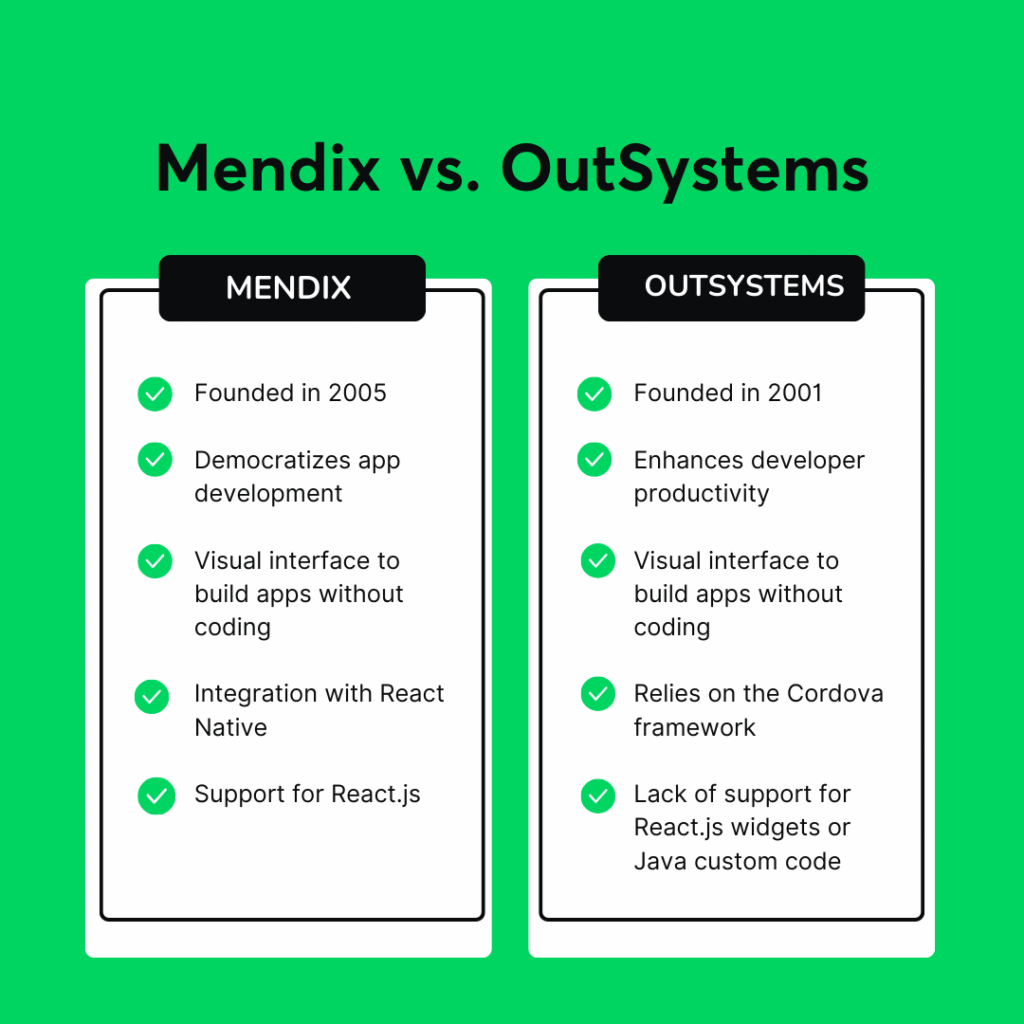
As the title low-code platform suggests, everything that is built in these platforms is visually rich, not just UI/UX, but also the backend processes and building logics. Both the platforms OutSystems as well as Medix have traded the traditional core coding process with visually high programming windows even for the business logic.
But doesn’t mean both platforms are the same; the underlying architectural philosophy defines how effectively the developers can manage the development process, asynchronous loops, and transactional boundaries to ensure secure and high-performing applications.
So, let’s dive into the way each platform conceives business logic and what are the underlying architecture which differentiate both platforms from each other.
OutSystems: The Imperative .NET Approach
Let’s first start with OutSystems. Well, OutSystems uses Service Studio as a component, which is mainly used for the development of applications.
Service Studio is the place where both frontend and backend development happen. So the developers create the UI through built-in elements as well as HTML and JavaScript codes, while it is tied to the backend through Server and Service actions, which connect to the Server.
These actions are a visual flow schema that comply synchronously, even when they can be called asynchronously, which in a way mirrors the standard procedure of core-coding or traditional development standards.
Let’s understand how the visual business logic works inside OutSystems.
Transactional Control: OutSystems automatically binds the transaction of the database with server-side actions, that is, Server and Service actions. So when the action flow starts execution, it automatically opens the transaction, and the changes are saved after the flow is executed successfully.
There are explicit transaction actions like CommitTransaction and AbortTransaction nodes, which can execute when called by developers who want to perform the transaction in the middle of the flow.
Asynchronous Processing: As we know, heavy loads can’t be handled by the normal Server or Service actions, so there are BPTs to manage the heavy backend workload of the application.
BPT stands for Business Process Technology, which helps the developers to model, manage and automate the complex and lengthy business running workflows without interrupting the user interface, so the business process is running in the background even when the user can’t see it, which enhances the speed as well as performance of the application.
Mendix: The Functional Java Engine
The application that Mendix uses for development purposes is Studio Pro, it is used to develop full fledged application which includes frontend as well as backend logic with flows named as Microflows and Nanoflows. These flows are divided into client-side and server-side flows.
Nanoflow is the client-side flow, which means all the changes that occur here are mainly based on browsers, or it is used to call the Microflow.
Microflow is the server-side flow, which executes inside the Mendix dedicated Runtime engine and performs CRUD operations on the server-side.
Now, let’s discuss how Mendix successfully manages to operate the complex and long business logic.
State Management: When we are talking about Mendix, it manages the database changes with stateful client-server at runtime. We can also say that it remembers the previous changes of the server and client sides during the entire process.
So, when the Microflow alters any object, Mendix uses the dirty tracking of the objects and automatically commits the changes in the database at the optimal time, so there are no missed transactions in the execution lifecycle.
Asynchronous Processing: As we know, the business logic can be lengthy and complex, due to which Mendix Task Queues are executed in the background through processes. It becomes possible as the developers assign certain Microflows to execute asynchronously on dedicated cluster nodes.
This is a setup where the resource-heavy tasks, such as invoice calculation or creation, are isolated from the main workflow, which helps to prevent the application from performance degradation.
Advanced Data Modelling and ORM Capabilities
Data is one of the most important parts of any application or website. The user never comes just for UI/UX or performance; they come for data, because data is the thing that provides the value, nothing else, neither the functionality nor the UI of the website or application.
So it becomes very important for the data to be fetched in a fast and efficient way so the application can retain its users and the performance of the application or website won’t diminish.
With technologies enhancing every decade and increasing the layers with it, it becomes important that complex business logics require a strong and reliable Object-Relational Mapping layer that has the ability to handle deep relational schemas, data inheritance, as well as multi-tenant architectural features without compromising the database performance.
So, let’s understand how OutSystems and Medix achieve it and what are the features which makes it possible for them to fetch a large amount of data in seconds.
OutSystems: Database-First and Native View Generation
When we talk about OutSystems, it has visual Entities which are directly connected to physical database tables. The platform has the ability to generate clean and standard SQL automatically with the visually rich tables, so while the developers don’t have to write the SQL by themselves, they are going to get the same result they would get after writing the SQL.
Advanced Querying: To handle complex queries or data aggregation, OutSystems have a query element called Aggregate, which is visually rich and provides the output of the query on the spot, while there is also an Advanced SQL block where developers can manually write raw, native SQL queries, which can include everything from inner/outer joins to windows functions and subqueries to get the result.
Even when OutSystems do provided Advance SQL block to write long and complex queries, most of the data can be easily fetched effectively by Aggregate, which makes the process of data fetching faster and cleaner for both the application as well as developers.
Database Extensibility: OutSystems can connect to external relational databases (SQL Server, Oracle, MySQL, PostgreSQL), as it has inbuild section for database integration section that acts as a standard database connector. This is because OutSystems generates the visual clone of the external database, so there is no inconsistency during the process of development, as well as it also lets the enterprise reporting tools like PowerBI or Tableau fetch the data by querying the underlying OutSystems database directly without going through an API layer.
Mendix: Domain-Driven and Meta-Model Polymorphism
Mendix is a platform that builds the data layer of a unified Domain Model, which is a visual representation of data structure in one’s application. With the Domain Model, it can use a highly advanced, abstracted ORM engine which can perform difficult or lengthy queries effectively.
But that’s not all, Mendix views data always keeping in view of object-oriented, domain-driven design. So now, let’s understand what the features or component which makes data fetching an easy and effective task in Medix.
Entity Inheritance: The Mendix database structure is created in a way that supports Generalization and Specialization for data inheritance.
So it can reduce the number of entities significantly, like a developer can create a base entity called User and specialize it into Customer and Employee entities. But that’s not it; in addition to that, Mendix Runtime also manages the underlying joins or single-table inheritance mapping automatically, that too at runtime.
OQL (Object Query Language): When the visual data is not compatible with complex requirements, just like OutSystems, it also has a query element, which is OQL. OQL removes the database layer entirely, allowing the developers to write queries on objects and associations on the Domain Model names rather than physical database table and column names.
Due to this, Mendix can provide total database independence, but also adds another layer of abstraction between the developer and the physical hardware.
Extending Low-Code with Custom Code Integration
No matter how great or high performing a low-code platform are, but there are times when the application demands functionality which are not inbuild in the platform, or there is no way for the platform to achieve it.
In those cases, there is a need for custom code extensions that let the developers achieve the desired results even after the shortcomings of the platform.
The complex cryptography, legacy SDK integration, algorithmic optimizations and many more complex topics are there, which still require custom coding execution.
Now, let’s understand how OutSystems and Medix, both platforms, achieve this to enhance the scalability of their application and make them capable of developing an enterprise-level application even with difficult requirements.
How OutSystems Integrates Custom Code: Integration Studio
OutSystems, being a low-code platforms knows it very well that there will never be a time when the platform can contain everything. But to overcome this shortcoming, OutSystems uses a few ways, so that even when the platform itself doesn’t have the functionality, still it could be developed through those ways.
Native C# Execution: OutSystems has a separate component called Integration Studio. It is the application where the developers can write the code of the functionality they want in explicit terms in C#, and then they can integrate it with OutSystems through extensions to use the functionality without any interruption or hurdle.
NuGet Dependency Management: Another way through which OutSystems embraces the core-coding power is that the developer can import any standard NuGet package or external library directly from the C# extension, so that you can leverage the advantages of the latest libraries or packages.
Compilation and Deployment: Once the application is developed, OutSystems compiles it into the standard C# code .dll binaries. Then these binaries are deployed directly into the application server’s IIS directory, executing at bare-metal speeds even when the development is a visually rich process due to the platform.
How Mendix Integrates Custom Code: Java Actions
Unlike OutSystems, Mendix is based on the Java ecosystem, and to extend its functionalities or build any new features that are not present in the platform, developers can write Java code to add those functionalities inside the Studio Pro, Java Actions. This feature makes Mendix more user-friendly as it saves the time for the developers by navigating through different applications for extensions.
Eclipse/IntelliJ Integration: As Mendix is a low-code platform that is based on Java ecosystems, due to which when the developers start developing the application, it automatically builds a Java application structure that normally the developer would build with external IDEs like Eclipse or IntelliJ IDEA.
The Content Wrapper: In Mendix, the developers get a comprehensive Java API (IContext, IMendixObject). Mendix also allow the custom Java code to interact directly with the Mendix runtime engine’s memory space, which lets the developers perform direct changes like manipulation of objects, triggering Microflows or handling the transaction programmatically inside the Studio Pro.
JAR Dependency Management: One process that makes the development process slow even in a low-code platform is updating the dependencies in all the modules. For a large application, sometimes it takes even hours to just update the dependencies before deployment. But not in Mendix, as the developer can drop a third-party Java library directly into the project’s userlib folder, while the Mendix runtime loader will automatically resolve the dependencies when the application compiles.
Integration Capabilities
The world is never black or white; it’s different shades of grey, and so are the industries. You will never find any industry that is successfully acquiring a significant portion of the market and is working on extremes, like just using the legacy applications or traditional methods nor there would any industry who is working totally on the advance tools like for now AI tools, every industry is in the middle, some have more traditional practices rather than modern while other have more modern tools than manual tasks.
And to ensure that there is good and smooth integration between the legacy apps and modern tools is an obligation every development technology has to fulfil to be capable of creating an enterprise-level application.
These two platforms, Mendix and OutSystems, also provide smooth integration options, but their ways of integrating are way too different from each other. So let’s find out how these two platforms integrate smoothly.
OutSystems Integration Capabilities
OutSystems knows that even when a platform like it can create modern applications, the world is still dependent a lot on the legacy application, and transformation will only be possible in specs.
That’s why there is already a different integration section in the OutSystems Service Studio where there are different ways to integrate the applications, so the business workflow executes smoothly. Let’s understand the main parts of OutSystems integration.
REST and SOAP Automation: API integrations sometimes get on the nerves of developers, not really sure the errors are caused because of the error from their side or from the side of the server, but not with OutSystems. OutSystems automates the process of API consumption.
The developer needs to paste a JSON payload or swagger definition by which the platform generates the data structure and visual integration method instantly.
SAP Native Integration: OutSystems have a separate integration section in the logic tab, and inside that integration, there is a separate option for SAP integration. It is a certified and highly reliable SAP integration layer.
It breaks down the complex SAP BAPIs (Business Application Programming Interfaces) and IDocs natively, which helps in transforming the complex enterprise resource planning (ERP) schemas into visually rich Entities within a few seconds.
Mendix Integration Capabilities
Just like OutSystems, Mendix is also a low-code platform. It knows that even when these platforms provide the vision of building fast and modern applications, still there will be need for the legacy application for uninterrupted business flow.
Due to this, Mendix also contain ways to integrate with different applications or databases, so its features aren’t just limited to what actually the platform can build.
Let’s now discuss what are the possible ways of integration in Mendix.
Published and Consumed OData: Mendix is the best tool when it comes to the OData standard, or we can say the Open Data Protocol standard. The platform lets the developers expose the entire database or Domain Models as safe, secure and cataloged OData services by just one click.
External application not only can access the Mendix data, but it can also filter, page or query the data according to their requirement by using the REST API’s protocol without having any endpoint design.
Mendix Data Hub / Integration Marketplace: We all know that no matter how much we promote reusability of actions or features, there will still be times when developers separately create the same features or data for their development process.
But in Mendix, there is a master list of all the data in one central place. So if a developer is building an application and needs some information or data from a different application, they can just do it by searching it in the master list and dragging and dropping it inside the project, which makes it extremely simple for the applications to communicate with each other.
| Feature | OutSystems | Mendix |
| Visual Business Logic | Uses Server Actions to build logic step-by-step like traditional programming. It translates your visual designs directly into standard Microsoft C# code that runs natively on the server. | Uses Microflows that run inside a smart visual engine. It keeps track of data automatically in the background, meaning the system manages changes to your data without you needing to explicitly tell it to save every time. |
| Advanced Data Modeling | Database-First: Maps data structures directly to standard database tables. This makes it very transparent for traditional database administrators, allowing you to write raw, custom SQL code easily for heavy data tasks. | Object-First: Uses a flexible domain model that supports “data inheritance” (e.g., creating a generic “User” and making specialized versions for “Customers” or “Employees”). It hides the complex database tables behind a clean visual layer. |
| Custom Code Capabilities | Integrates with C# (.NET). If the visual tools aren’t enough, developers use Microsoft Visual Studio to write native C# code, which compiles and runs at bare-metal speeds. | Integrates with Java. Developers use standard Java IDEs (like Eclipse or IntelliJ) to write custom code that plugs directly into the Mendix engine to handle specialized logic. |
| Integration Flow | Automatically reads API files (REST/SOAP) and transforms them into visual blocks instantly. It also includes built-in, deep connectors designed specifically for large enterprise systems like SAP. | Built around OData standards. It features a centralized Data Hub (an internal search engine for your company’s data) that lets developers drag and drop data assets across different apps without writing complex connection code. |
Conclusion
As we know that everything needs specifications to get the best result, no one medicine can treat all the diseases, nor can one size fit all the people, so how can one platform be compatible for all types of application development? So by understanding and matching the platform’s performance, the compilation and integration process can ensure that you are choosing the right platform for the right type of app.
So, we can conclude that understanding the architecture, the complexity of integration and the liberty to add on the custom features, everything needs to be analyzed thoroughly before an organization can make a decision regarding which low-code platform they should use. I hope this blog helps the organization with the same.
Happy Coding!

I have been developing software for more than 10+ years, and I am an IT specialist. At the moment, I work with Prodfinity as a Technical Consultant. Through project delivery, I consistently focus on giving the client a high-value product rather than merely software. I take an active position in the Scrum Team and help the team solve problems for clients.